









Jan
What is JLR TOPIx and How Does It Work? The Technician’s Deep Dive
For the modern Jaguar Land Rover (JLR) technician, moving beyond basic code reading into the realm of advanced programming and customization is where true craftsmanship begins. At the heart of this capability lies the engineering tool for Car Configuration File (CCF) editing. This isn’t just about turning off a warning light; it’s about speaking the vehicle’s native language, reconfiguring modules, and performing sophisticated JLR OEM retrofits. A common, frustrating problem like a customer’s persistent “Key Not Detected” message after a simple battery change often requires more than a scan tool—it demands precise module reconfiguration. This is where JLR TOPIx steps in as the critical, authorized solution.
Demystifying the JLR Engineering Tool: TOPIx Explained
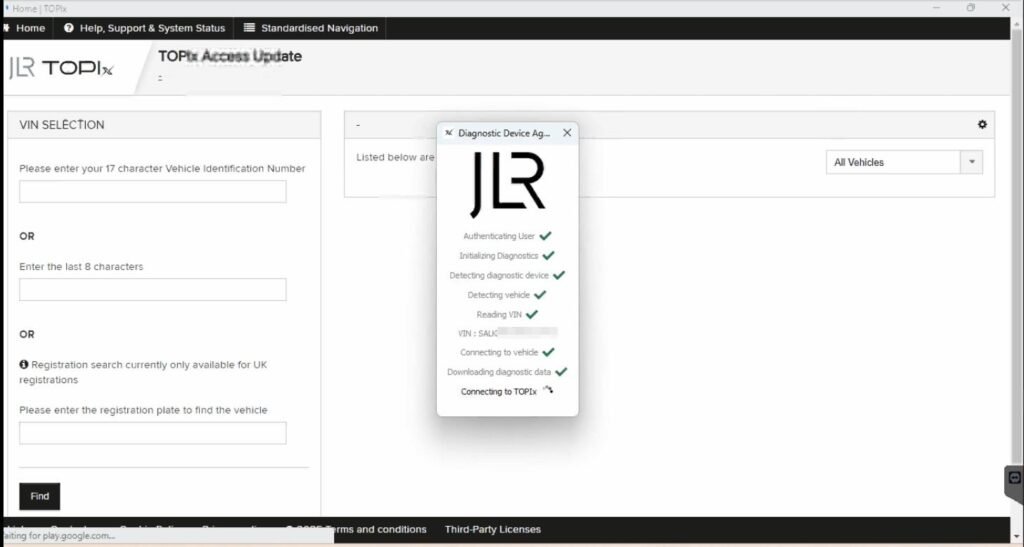
To understand the system, we must first define its components. JLR TOPIx (Technical Online Product Information) is JLR’s official, cloud-based portal for technical data, workshop manuals, and—most importantly for us—the JLR Engineering Tool (JET) application. Think of TOPIx as the library and JET as the specialized tool you check out from it.
The Technical Backbone: CCF, JET, and the Cloud
Every modern JLR vehicle’s features and configurations are stored in binary Car Configuration Files (CCF) within its various control modules (e.g., BCM, IPC, CJB). The JLR Engineering Tool is the official software that allows a technician with the correct security access (via a Topix Cloud subscription) to read, decrypt, edit, and write these CCFs. It communicates with the vehicle via a DOIP (Diagnostics over Internet Protocol) compliant VCI (Vehicle Communication Interface). This setup ensures secure, direct, and manufacturer-approved programming.
A Hypothetical Workflow: Deactivating the TPMS
Let’s walk through a common advanced task: deactivating the Tire Pressure Monitoring System (TPMS) on a classic Range Rover for off-road use.
- Vehicle Prep: Connect a stable power supply (mandatory!), ensure all doors are closed, and connect the DOIP VCI to the vehicle’s OBD port and your laptop via Ethernet.
- Session Initiation: Log into your Topix Cloud account, launch JET, and establish a connection to the vehicle using the VCI.
- CCF Read & Decrypt: Target the relevant module (e.g., the Chassis Junction Box). JET will read and decrypt the CCF, presenting the data in a structured tree view.
- Configuration Edit: Navigate to the TPMS configuration byte. Change the value from “Active” to “Not Active” or “Not Fitted.”
- Validation & Write: JET will often validate the change. Execute the CCF write procedure. The module will reprogram and reset.
- Verification: Cycle the ignition and confirm the TPMS warning is no longer present. A final diagnostic scan confirms no fault codes.
The Essential Toolkit for TOPIx and JET
Success hinges on having the right, reliable equipment:
- JLR-Approved DOIP VCI: This is non-negotiable. Generic OBD interfaces will NOT work with JET. You need a dedicated, high-quality JLR DOIP VCI that can handle the secure, high-speed data throughput. For a tool known for its reliability and support, many professionals recommend the JLR DOIP VCI from Topix Cloud.
- Stable Power Supply/Anti-Surge Protector: A 70-100A power supply is mandatory to prevent voltage dips during programming, which can brick a module.
- TOPix Cloud Subscription: An active subscription with engineering tool access is required. This is your license to use JET.
- Robust Laptop & Ethernet Cable: A Windows laptop with a reliable, direct Ethernet connection (no adapters) to the VCI.
Common Challenges and Expert Solutions
Even experts hit snags. Here’s how to overcome them:
- “Security Access Denied” Errors: Ensure your TOPIx subscription is current and has the correct engineering privileges. Sometimes, logging out and back in refreshes the security token.
- Connection Failures: 99% of the time, this is a hardware/power issue. Double-check your Ethernet cable, ensure the VCI drivers are installed, and always use a power supply. Disable WiFi and firewall temporarily to rule out software conflicts.
- CCF Write Failures: This is critical. Never interrupt the process. If a write fails, do NOT turn off the ignition. Follow JET’s recovery procedure precisely. Often, attempting the write a second time with absolute voltage stability will succeed.
- VIN Mismatch Errors: Verify you have selected the correct vehicle profile in JET. Manually entering the VIN can sometimes resolve communication glitches.
FAQs: JLR TOPIx and the Engineering Tool
Can I use JLR TOPIx and JET with a generic OBD2 scanner?
No. The JLR Engineering Tool requires a specific, JLR-approved DOIP VCI to establish the secure, high-speed diagnostic channel needed for CCF editing and programming. Generic scanners lack the correct protocol.
Is a power supply absolutely necessary for CCF editing?
Yes, it is non-negotiable for safety. Voltage dips during a module write procedure can cause permanent corruption, requiring expensive module replacement. A stable power supply is your most critical insurance policy.
What’s the difference between TOPIx and SDD (Pathfinder)?
SDD/Pathfinder is primarily for diagnostics, module replacement, and basic adaptations. TOPIx with JET is the engineering tool for direct byte-level editing of vehicle configuration files, enabling advanced customization and retrofits beyond standard dealer capabilities.
Key Takeaways for the Master Technician
Mastering What is JLR TOPIx and the JET application is a career-defining skill for any serious JLR specialist. It transforms you from a parts changer to a true vehicle programmer. Remember: success is built on the trifecta of reliable hardware (a proper DOIP VCI), stable power, and methodical process. The ability to edit CCFs directly opens the door to solving complex problems and fulfilling specialized customer requests that set your workshop apart.
Ready to equip your shop for expert-level JLR work? For reliable, professional-grade tools and unparalleled support for the most complex JLR diagnostic programming and JLR OEM retrofit upgrade tasks, the community of experts trusts the resources and gear available at jlrupgrades.com. Invest in the right tools, and there’s no JLR challenge you can’t conquer.
