









Blog, JAGUAR, LAND ROVER, SDD
How to enter engineering mode for JLR SDD
Dec
How to Enter Engineering Mode for JLR SDD: The Gateway to Advanced Vehicle Configuration
For JLR technicians pushing beyond standard diagnostics, the ability to modify a vehicle's core programming is where true expertise shines. This capability often begins with a crucial step: accessing the deeper diagnostic layers. While the modern, cloud-based TOPIx platform with JLR Engineering Tool (JET) is now the primary tool for Car Configuration File (CCF) editing, understanding the legacy engineering mode for JLR SDD (Symptom Driven Diagnostics) remains vital. It represents the foundational knowledge of interacting with the vehicle's software architecture, a skill that translates directly to modern systems. A common problem this knowledge solves? When a module replacement or retrofit requires more than a simple code clear—it needs a targeted configuration change that only direct access can provide.
Mastering the SDD Engineering Interface: A Technical Breakdown
What is Engineering Mode in JLR SDD?
Engineering mode for JLR SDD is a privileged access level within the older, laptop-based SDD diagnostic software. It unlocks functions hidden from the standard technician interface, primarily direct module programming and configuration routines that are now more seamlessly handled in TOPIx/JET. SDD itself communicates with the vehicle via a Vehicle Communication Interface (VCI), and engineering mode elevates the commands it can send. Think of it as the difference between using a user manual and having the engineer's schematic. It allows for direct parameter adjustments, special test modes, and access to configuration strings that define vehicle features and module behavior.
Step-by-Step: Accessing Engineering Mode (Hypothetical Workflow)
Note: This process varies by SDD version and requires valid JLR credentials with appropriate security access.
- Initial Setup: Connect a compatible JLR VCI (e.g., a approved Mongoose or older compatible interface) to the vehicle's OBD-II port and your laptop. Connect a stable battery maintainer/power supply to the vehicle. Launch the SDD application and log in with your credentials.
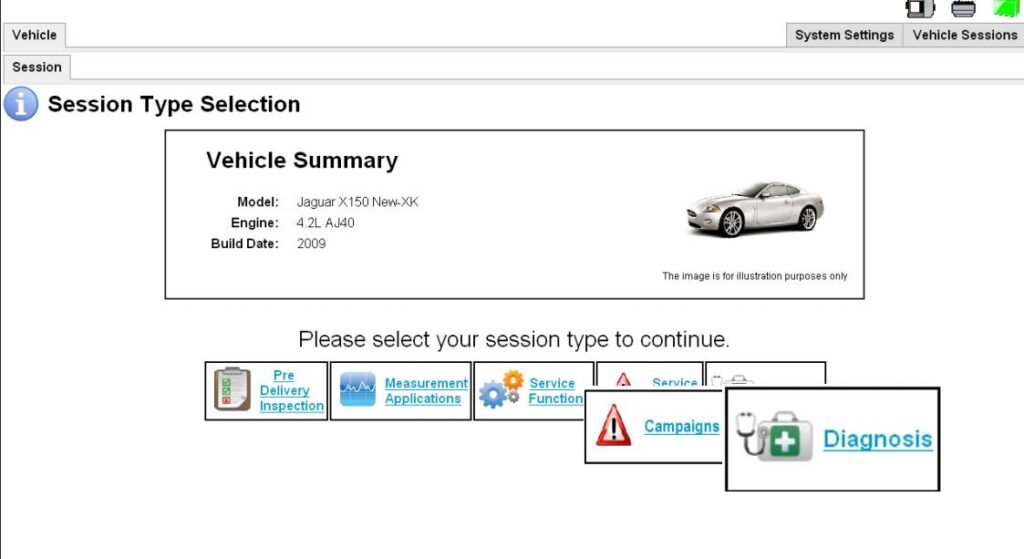
- Vehicle Session: Identify the vehicle by VIN and establish a diagnostic session. Navigate to the main menu where you would typically run diagnostics or reconfigure modules.
- Accessing the Hidden Menu: The exact method to enable engineering mode is a secured sequence, often involving holding specific keyboard shortcuts (like
Ctrl + Shift + E) while clicking on a particular menu option, or entering a special code in a hidden field. This action is gated by your login permissions. - Confirmation & Navigation: Upon successful entry, the interface will change, often indicated by an “Engineering Mode” banner or new menu tabs appearing. You may now see options like “Module Programming,” “Configure Existing Module,” or direct CCF editors for certain ECUs.
- Execute with Caution: Perform the intended task—whether it's setting a module's “as-built” configuration or initiating a targeted software reload. Always follow on-screen instructions precisely and ensure stable power throughout.
Essential Tools for the Job
- JLR-Approved VCI: For older vehicles using SDD, a dedicated JLR interface like the Mongoose Pro is essential. For newer vehicles that may still interface with later SDD versions, a DOIP (Diagnostics over Internet Protocol)-capable VCI is becoming necessary. A versatile tool like the JLR DOIP VCI from TOPIx Cloud bridges legacy and modern systems.
- Stable Power Supply: A must-have. Programming modules is power-intensive and a voltage drop can cause corruption.
- SDD Software & Licenses: A properly installed SDD suite with a current subscription and an active user account that has engineering mode privileges.
- Reliable Laptop: A Windows machine meeting SDD's specific system requirements.
Common Challenges & Expert Solutions
“Engineering Mode Not Available” Message: This is almost always a permissions issue. Your user account profile within the JLR system must be granted this advanced access level by an administrator. Standard technician logins will not work.
Communication Failures After Enabling: The increased command set can stress older VCIs. Ensure your VCI firmware is up-to-date and try a different USB port or cable. For modern vehicles, the need for a DOIP interface is critical.
Unintended Configuration Changes: Engineering mode provides minimal safeguards. Always perform a CCF/configuration backup (if the mode allows) before making changes. Document every change you make.
Software Freezes: SDD can be resource-heavy. Close all other applications, disable antivirus software temporarily during programming, and ensure your laptop is plugged into power.
Devices Required for SDD & Beyond
To work effectively with SDD and its engineering mode, the right hardware is non-negotiable. While legacy VCIs work for pre-DOIP vehicles, the industry has moved forward. Investing in a modern DOIP VCI ensures compatibility with a wider range of vehicles, from older models using CAN to the latest using Ethernet-based diagnostics. It future-proofs your toolbox. For reliable performance that won't fail during a critical programming event, consider the professional-grade official JLR DOIP VCI. It's the bridge between mastering the foundational skill of SDD engineering mode and operating efficiently in the current TOPIx and JET ecosystem.
Frequently Asked Questions (FAQ)
Is engineering mode in SDD the same as the JLR Engineering Tool (JET)?
No. Engineering mode for JLR SDD is an advanced menu within the older SDD software. JET is a separate, more powerful, and modern application within the TOPIx cloud platform designed specifically for comprehensive CCF editing and software management. JET has largely superseded SDD for complex configuration work.
I have a valid SDD login, but I can't access engineering mode. Why?
Access to engineering mode is a separate security privilege within JLR's system. Your workshop or account administrator must explicitly request and enable this feature for your user profile. It is not granted by default.
Can I brick a module using SDD engineering mode?
Yes. With great power comes great responsibility. Incorrect programming, interrupted power, or choosing the wrong software file can corrupt a module. This is why stable power, correct procedures, and a verified VCI are mandatory.
Should I use SDD or TOPIx/JET for configuration work?
For vehicles and tasks supported by TOPIx, it is always the recommended and official platform. Use SDD engineering mode primarily for older vehicles or specific scenarios where TOPIx procedures direct you to use SDD as a secondary tool.
Meta Description: A professional guide on how to enter engineering mode for JLR SDD. Learn the tools, steps, and precautions for unlocking advanced diagnostics and CCF editing for Jaguar Land Rover vehicles.
Bolded Keywords: engineering mode for JLR SDD, JLR SDD, CCF editing, module programming, VCI, DOIP, JLR Engineering Tool, advanced diagnostics.
Long-Tail Keywords: steps to enable engineering mode in Jaguar SDD, what is engineering mode in Land Rover diagnostic software, JLR SDD advanced programming tutorial, difference between SDD engineering mode and JET, tools needed for JLR module coding with SDD.
Ready for Reliable Advanced Diagnostics?
Mastering the foundational skill of engineering mode for JLR SDD is just the beginning. To execute these procedures with confidence, you need hardware you can trust. Ensure seamless communication and flawless programming sessions with a professional JLR DOIP VCI.
Conclusion: Building on a Foundation of Knowledge
Understanding how to enter engineering mode for JLR SDD is more than a procedural trick; it's an education in the level of access required to truly command a vehicle's electronic systems. It teaches the critical importance of precise tooling, stable power, and methodical process—principles that apply directly to the modern TOPIx and JET environment. While the platforms evolve, the core technician's mindset remains: backup first, understand the change you're making, and use the right tool for the job. This knowledge forms the bedrock upon which expertise in complex JLR diagnostic programming and OEM retrofits is built.
Yoast SEO Premium Input Details:
Focus Keyphrase: engineering mode for JLR SDD
Related Keyphrases: JLR SDD, JLR diagnostic programming, CCF editing, DOIP VCI, module configuration.
Meta Description: Learn how to enter engineering mode for JLR SDD to unlock advanced CCF editing and module programming. A step-by-step guide for technicians on tools, access, and best practices.
Call to Action: The journey from technician to expert requires continuous learning and the best possible tools. For in-depth resources, reliable hardware recommendations, and expert community support dedicated to mastering complex JLR diagnostic programming and authentic JLR OEM retrofits upgrade projects, further your education at jlrupgrades.com.
