






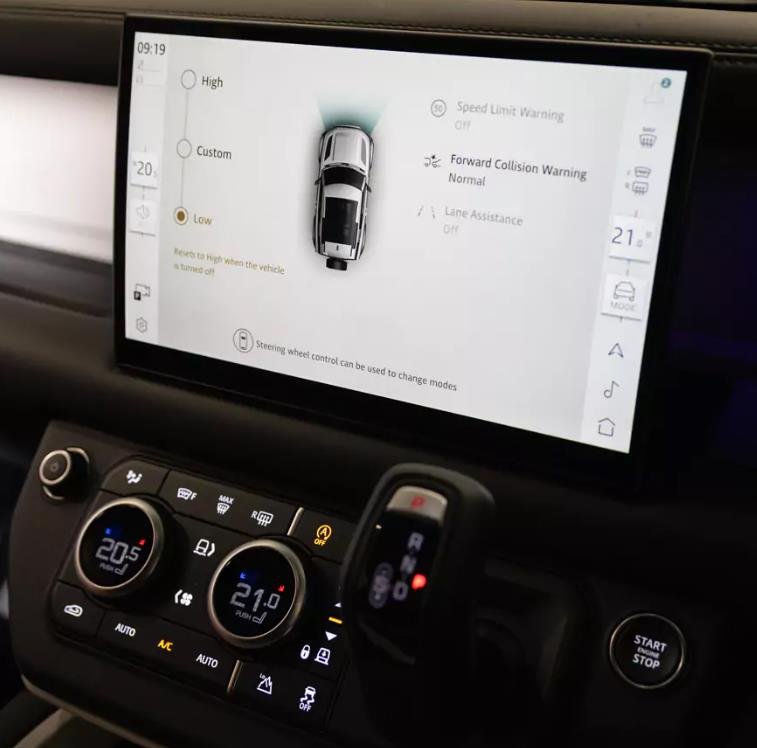

Technical Overview of JLR Configurable Drivers Assist
Configurable Drivers Assist is not a single system, but rather a suite of programmable parameters that govern the behavior and interaction of multiple ADAS features. It bridges the gap between standardized system operation and driver-specific preference.
System Logic and CCF Integration
The core functionality involves modifying parameters within the CCF that control alert timing, sensitivity, and modality. Key systems affected often include:
- Lane Departure Warning (LDW): CCF parameters can allow the driver to select between early or late warning thresholds for lane drift detection.
- Forward Alert with Brake Support: The sensitivity of the forward collision warning (e.g., High, Normal, Low) can be made configurable via the infotainment menu after the underlying CCF switch is enabled.
- Blind Spot Assist (BSA): Configuration can enable or disable additional haptic alerts (vibration through the steering wheel) in conjunction with the standard visual mirror alerts.
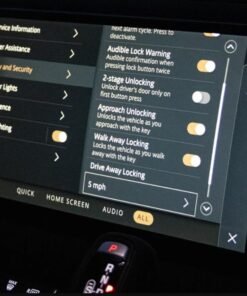
Typically, multiple modules manage these settings. These include the Image Processing Module (IPM) or Camera Module and the Radar modules. The Body Control Module (BCM) also plays a key role. Specifically, it handles integration with the driver-accessible menus in the Instrument Cluster or Touchscreen.
Hypothetical Step-by-Step Process for Configuration
Disclaimer: This is a generalized procedural outline. Always consult official JLR technical documentation for vehicle-specific instructions. Incorrect ADAS configuration can impact vehicle safety.
- Pre-Programming System Health Check: Connect a DOIP VCI to the vehicle. Perform a comprehensive diagnostic scan. Check for any pre-existing faults in the ADAS domain (IPM, Radar, Steering Angle Sensor, etc.) and resolve them before proceeding.
- JET Session Establishment: Log in to the TOPIx cloud platform with a valid subscription. Launch JET, input the VIN, and establish a secure diagnostic session.
- Critical CCF Backup: Before any modification, use JET to read and save a complete backup of the vehicle’s original CCF. This is your essential rollback point.
- Configuration Editing: Navigate the CCF tree to the relevant modules. This typically involves the IPM for camera-based features (LDW) and the BCM for HMI and menu enablement. Locate and enable parameters for “Configurable Driver Assist,” “Lane Departure Warning Mode Selection,” “Forward Alert Sensitivity Selection,” and “Blind Spot Assist Haptic Feedback.”
- Write and Validate Configuration: Write the modified CCF blocks back to the vehicle. Confirm a successful programming event.
- Mandatory Sensor Calibration: This is a critical step. After the CCF write, you must perform a static calibration of the forward-facing camera and, if applicable, the radar sensors using JLR’s guided functions and official calibration targets.
- Post-Programming Verification: Initiate a module sleep cycle. Upon wake-up, clear any configuration fault codes. Verify the new configurable options are available in the vehicle’s driver assist menu and test system functionality in a safe environment.
Essential Toolkit for Drivers Assist Programming
This procedure demands professional-grade equipment to ensure data integrity and system safety.
- DOIP VCI: ADAS module programming requires high-speed data transfer. For this, you need a high-quality Vehicle Communication Interface (VCI) that supports Diagnostics over Internet Protocol (DOIP). Therefore, choose a DOIP-compatible VCI for reliable results.
- Stable Power Supply: A professional battery maintainer is non-negotiable. Voltage drops during CCF writing can corrupt critical safety modules.
- JLR Software Access: An active JLR subscription for TOPIx and the JLR Engineering Tool (JET) is mandatory for authentication and access to ADAS configuration menus.
- Calibration Tools: Official JLR calibration targets and a fully adjustable alignment fixture are required for the post-programming sensor calibration.
- Reliable Programming Hardware: For a precise and reliable process, using a device specifically configured for this task is recommended. Technicians should consider the dedicated JLR Configurable Drivers Assist programming solution from TOPIx Cloud.
Common Challenges and Technical Resolution
Technicians may encounter specific issues during this process:
- Configuration Menu Not Appearing: This indicates an incomplete CCF edit. The menu enablement parameter in the BCM or Instrument Cluster CCF is often separate from the functional enablement in the IPM/Radar. Both must be correctly set.
- Persistent ADAS Faults Post-Coding: The most common cause is skipping or incorrectly performing the sensor calibration. The systems will remain faulted until a successful calibration is completed and verified.
- ‘System Not Available’ Message: This can be caused by a CCF configuration that the vehicle’s hardware does not support. Verify hardware compatibility (e.g., presence of a heated steering wheel for haptic BSA) before coding.
- Intermittent System Operation: After coding and calibration, ensure the windshield is clean and free of defects in the camera’s field of view, and that radar sensor surfaces are clean and unobstructed.
Conclusion
Programming Configurable Drivers Assist features represents an advanced application of CCF editing that directly impacts the driver-vehicle interface and safety system interaction. Success is contingent upon a meticulous process, the use of professional tools like a DOIP VCI, and a rigorous adherence to post-programming calibration protocols. Technicians must approach this task with an understanding that they are modifying critical safety systems, where precision is non-negotiable.
For technicians and workshops specializing in advanced JLR diagnostic programming and JLR OEM retrofits, accessing reliable tools and expert support is crucial. For more information on specialized equipment and professional guidance, visit jlrupgrades.com.