JLR CCF Editing: Complete Guide to Variant Coding with TOPIx Cloud
Editing the Car Configuration File (CCF) is one of the most common tasks a JLR workshop technician performs. Whether enabling a factory-fitted feature, reconfiguring a module after replacement, or adjusting regional settings for a grey import, CCF editing gives direct control over vehicle behaviour. This guide explains how to edit the JLR CCF safely using TOPIx Cloud. Subscriptions start from £79 with CCF editing guidance included, and the Professional Monthly plan at £799 is recommended for workshops carrying out regular coding and variant configuration work.
What Is CCF (Car Configuration File)?
The Car Configuration File (CCF) is the master data record that defines a vehicle's build specification. It is stored in the Body Control Module (BCM) — also known as the Gateway Module (GWM) on newer JLR architectures — and acts as the central reference for every other module on the network. Each module checks the CCF on initialisation to understand what features the vehicle is supposed to have.
The CCF is a structured binary file containing variant codes, market codes, and feature flags. If a vehicle left the factory with hardware for Adaptive Cruise Control (ACC) but the feature was not enabled in the CCF, the radar module sits dormant. Edit the CCF, write it back, and the feature becomes operational.
It is important to distinguish CCF editing from module-level coding. While individual modules can be coded with scan tools, they defer to the CCF for their configuration baseline. If the CCF does not recognise a feature as present, the module will typically disable it regardless of its own coding. Therefore, CCF editing is the foundational step for any meaningful variant configuration on JLR vehicles.
What Can You Change with CCF Editing?
CCF editing covers three broad categories: feature activations, regional settings, and module variant coding. The exact scope depends on the vehicle model year, network architecture, and whether the CCF is locked on newer platforms. On vehicles up to approximately 2020–2022, the CCF is generally editable with standard JLR diagnostic tools. Newer platforms may require additional authentication.
Feature Activations
Feature activations are the most common reason workshops edit the CCF. Examples include:
- Adaptive Cruise Control (ACC) — enabling the radar-based cruise system where hardware is already fitted
- Apple CarPlay / Android Auto — activating smartphone projection on compatible head units
- Ambient Lighting — enabling cabin lighting control where LED hardware is present
- Surround Camera / 360° View — activating the camera processing module
- Park Assist / Park Pilot — enabling automated parking assistance
- Heated / Cooled Seats and Steering Wheel — activating climate controls for fitted options
- Traffic Sign Recognition — enabling the camera-based speed sign reading system
- Performance Displays — enabling dynamic display modes on performance variants
CCF editing enables features the vehicle is already equipped to support. It cannot add hardware that does not exist. If a vehicle was not built with the ACC radar, enabling the CCF flag will not make the system operational. However, many vehicles — particularly fleet or lease returns — are built with full hardware but only base-level features activated, leaving the remainder as dealer-upgradable options. This is where CCF editing delivers immediate value.
Regional Settings
Regional settings determine how the vehicle behaves in different markets. Common changes include:
- Units of measurement — switching between imperial and metric
- Language packs — enabling additional languages for the head unit or instrument cluster
- Lighting behaviour — configuring daytime running lights, rear fog lights, and headlamp wash for local regulations
- Seatbelt warnings and chimes — adjusting alert behaviour to match market requirements
- Speed warning chimes — enabling or disabling the 120 km/h warning tone
- Fuel tank calibration — adjusting for different fuel qualities or tank sizes
These changes are particularly important for independent importers and grey-import specialists preparing vehicles for registration in a different country.
Module Variant Coding
Beyond features and regions, the CCF also contains variant codes that tell individual modules how to behave. Examples include:
- Engine variant codes — ensuring the ECM recognises the correct power output and emissions calibration
- Transmission variant codes — matching the TCM to the fitted gearbox and final drive ratio
- Suspension variant codes — configuring the adaptive dynamics module for air suspension or passive dampers
- Brake variant codes — ensuring the ABS module recognises the correct brake disc size
- Body style codes — saloon, estate, coupé, convertible, or SUV configuration for the BCM
Module variant coding is most commonly needed after a module replacement. If a new BCM, GWM, or ECM is fitted from a donor vehicle, it will carry the donor's variant codes. The technician must overwrite the CCF with the correct codes for the host vehicle, or modules will behave incorrectly or trigger warning lights.
Tools Required for CCF Editing
Editing the CCF requires the correct hardware interface, a reliable software platform, and a stable power supply. Cutting corners increases the risk of corrupted configuration data, leaving a vehicle in a non-start state or with multiple module fault codes.
VCI (Vehicle Communication Interface)
The VCI is the bridge between your laptop and the vehicle's diagnostic network. Recommended interfaces for JLR CCF editing:
- DrewTech MongoosePro JLR — the industry-standard interface for JLR SDD, Pathfinder, and TOPIx Cloud. Supports high-speed CAN and legacy K-line protocols.
- JLR-approved VCI — the official dealer-level interface. Most reliable but most expensive.
- Bosch / VAS 5054A (with JLR passthru) — some aftermarket interfaces support JLR passthru, but compatibility is not guaranteed.
For regular CCF work, the MongoosePro JLR is the practical choice. It handles the security handshakes required for CCF read/write. Ensure the firmware is up to date to avoid timeouts or failed writes.
Software Platform
TOPIx Cloud provides:
- Full CCF read and write capability
- Automatic CCF backup before any changes
- Validation of CCF fields against known-good baselines
- Guided editing with parameter descriptions
- Integration with JLR's latest module configuration files
TOPIx Cloud runs in a browser with a secure connection to the vehicle via the VCI. Subscriptions start from £79, with the Professional Monthly plan at £799 recommended for workshops that perform CCF editing regularly. The higher-tier plan includes priority support, faster data throughput, and access to the latest CCF databases.
Power Supply
A stable battery voltage is essential during CCF read/write operations. A drop below approximately 11.5 V during a write can corrupt the CCF and potentially brick the BCM or GWM.
- Battery support unit — a regulated 13.8 V power supply rated at 40 A or higher, connected to the battery terminals
- Do not rely on the alternator — engine running is not sufficient protection; alternator output fluctuates with load and RPM
- Close doors and disable consumers — turn off headlights, HVAC, heated screens, and audio systems to minimise current draw
Workshops performing CCF editing regularly should treat a battery support unit as mandatory equipment.
Laptop and Network
- Windows 10 or 11 — recommended for driver compatibility with the VCI
- USB 2.0 or 3.0 port — for direct VCI connection; avoid USB hubs
- Stable internet connection — TOPIx Cloud requires an active connection to authenticate and download the latest configuration files
- Minimum 8 GB RAM — to handle the browser session and concurrent diagnostic processes
Step-by-Step CCF Editing in TOPIx Cloud
This section provides the complete workflow for reading, editing, and writing the CCF using TOPIx Cloud. Follow the steps in order and do not skip the backup stage.
Step 1 — Connect VCI and Read Vehicle
- Connect the battery support unit and confirm stable voltage (13.5–14.5 V).
- Connect the VCI to the OBD-II port and to your laptop via USB.
- Open TOPIx Cloud, log in, and select Diagnostic Session.
- Ignition on, engine off. On push-button vehicles, press the start button twice without your foot on the brake.
- Select Read Vehicle Identification or Auto-ID. TOPIx Cloud will read the VIN, model code, and current module configuration.
- Confirm the details match. If there is a mismatch, stop and investigate.
Step 2 — Navigate to CCF Editor
- Select CCF / CCF Editor from the diagnostic menu.
- TOPIx Cloud will display the current CCF version, checksum, and last modified date.
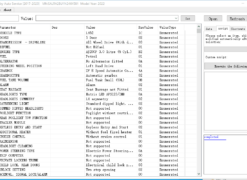
- The editor presents the CCF as a structured tree or table with categories: Vehicle Information, Feature Flags, Regional Settings, and Module Variant Codes.
- Some fields are read-only (greyed out) if protected by security. Do not attempt to force-write read-only fields; this can trigger security lockouts.
Step 3 — Backup Current CCF
- In the CCF Editor, select Backup / Export Current CCF.
- TOPIx Cloud will save the CCF as a binary file and a human-readable summary to your local machine.
- Save with a clear filename, for example:
SALVA2BN0MH123456_Original_20260702.ccf. - Store the backup in a secure location. This is your insurance policy if a write fails.
- Take a screenshot of the current feature flags and variant codes for quick reference.
Never skip the backup. A corrupted CCF without a backup can require dealer-level intervention or module replacement.
Step 4 — Make Changes
- Identify the field or fields you need to edit using the search function or category tree.
- Common field types:
- Boolean flags — tickbox or toggle. Example:
Adaptive Cruise Control = Yes - Enumerated values — dropdown list. Example:
Market Region = UK / Europe / Middle East / North America - Numeric codes — direct entry of a variant code. Example:
Engine Variant Code = 204PT
- Boolean flags — tickbox or toggle. Example:
- Make changes one category at a time. Note the original and new values in your workshop log for documentation.
- Do not guess unknown codes. Use the Lookup or Suggest function in TOPIx Cloud, or consult the vehicle's build sheet.
- Review the Summary of Changes screen before proceeding. Verify every entry.
Step 5 — Write CCF Back to Vehicle
- Confirm the battery support unit is connected and voltage is stable.
- Ensure all doors are closed and electrical consumers are off.
- In TOPIx Cloud, select Write CCF to Vehicle.
- The software performs pre-write validation: checksum verification, compatibility check, and security handshake with the BCM/GWM.
- If validation fails, do not force the write. Common causes include an incorrect VIN, a mismatched module variant, or a security lockout.
- If validation passes, confirm the write. The process typically takes 30 seconds to 3 minutes.
- Do not disconnect the VCI or power down the laptop during the write. Interrupting the write is the most common cause of CCF corruption.
- Once complete, TOPIx Cloud displays a success message and the new CCF checksum.
Step 6 — Verify Changes
- Ignition off, wait 10 seconds, then ignition on again.
- Use TOPIx Cloud to read the CCF back and confirm the new values are present.
- Perform a full network scan to check for communication faults or DTCs.
- Test the vehicle functions you changed:
- If you enabled ACC, confirm the cruise control menu appears on a road test.
- If you enabled CarPlay, pair an iPhone and confirm the icon appears on the head unit.
- If you changed lighting settings, cycle through the light switch positions.
- Clear any spurious DTCs. Temporary U-codes are common after a CCF write and usually clear with an ignition cycle.
- Do not return the vehicle to the customer with active configuration DTCs.
Common CCF Changes for JLR
The following are the most frequently requested CCF edits in independent JLR workshops. Each assumes the necessary hardware is fitted.
Enable ACC / Adaptive Cruise Control
ACC is one of the highest-value feature activations. Many Range Rover and Range Rover Sport vehicles are built with the radar sensor but shipped with ACC disabled if the original order did not specify it. To enable:
- Locate the feature flag
Adaptive Cruise ControlorACC Enableunder Driver Assistance. - Change from
NotoYes. - Write the CCF and verify the cruise control stalk or steering wheel buttons now activate ACC mode.
On some vehicles, the instrument cluster may require a separate calibration file update to display ACC graphics. If the display is incomplete, check for cluster updates in TOPIx Cloud.
Enable CarPlay / Android Auto
CarPlay and Android Auto activation is one of the most common customer requests for 2016–2022 vehicles with InControl Touch Pro or Pivi Pro. The head unit hardware is typically identical across trim levels; the difference is software licensing and CCF flags.
- In the CCF Editor, navigate to Infotainment / Connectivity.
- Locate
Apple CarPlay EnableandAndroid Auto Enable. - Set both to
Yesif required. - Some vehicles also have a
Smartphone PackageorConnectivity Packmaster flag that must be enabled. - Write the CCF and restart the head unit (hold the power button for 10 seconds).
- Pair the customer's phone and confirm projection launches.
On 2020+ vehicles with Pivi Pro, CarPlay may also require a software subscription or licence file in addition to the CCF flag. TOPIx Cloud will indicate if a licence is required.
Enable AMG Menu / Performance Displays
The dynamic display menu (often called Dynamic-i or Performance Displays) shows real-time power, torque, and g-force data. It is available on many Jaguar F-Type, XE S, and Range Rover Sport SVR vehicles but disabled in the standard CCF.
- Navigate to Instrument Cluster / Display Options.
- Locate
Performance Display EnableorDynamic Mode Display. - Set to
Yes. - Write the CCF and cycle the ignition.
- In the instrument cluster menu, look for a new Dynamic or Performance section.
If the menu does not appear, check that the instrument cluster is the high-resolution type required for performance graphics.
Change Lighting Behaviour
Lighting changes are common for market compliance and customer preference:
- Daytime Running Lights (DRL) — enable or disable under Lighting / Exterior.
- Rear Fog Lights — required for UK and European type approval.
- Cornering Lights — activate steering-linked or speed-dependent cornering lamps.
- Headlamp Wash — enable or disable the headlamp washer system.
- Welcome Lighting — configure puddle lamp behaviour when the vehicle is unlocked.
After any lighting CCF change, perform a functional test of all exterior lamps. Incorrect DRL configuration can cause MOT or safety inspection failures.
Disable Start-Stop
Many customers request the start-stop system be disabled for comfort or to reduce starter motor wear. On JLR vehicles, the CCF controls whether the start-stop module is active or permanently disabled.
- Navigate to Engine / Start-Stop System.
- Locate
Start-Stop EnableorAuto Stop-Start. - Set to
No. - Write the CCF and verify the system no longer activates at traffic lights.
In some markets, disabling start-stop may affect emissions test results. Document the change on the customer invoice and advise accordingly.
Risks and Safety Precautions
CCF editing is a powerful capability, but it carries risks that every technician must understand.
Corrupted CCF
A corrupted CCF is the most serious risk. If the write is interrupted, the battery voltage drops, or an incorrect checksum is generated, the BCM or GWM may reject the new CCF but fail to fall back cleanly. This can result in non-communication with modules, warning lights, failure to start, or loss of immobiliser synchronisation.
Mitigation: always maintain stable power, always create a backup, and never force a write that fails validation.
Module Lockout
Some newer JLR platforms (2021 onwards) have enhanced security that detects unauthorised CCF changes. In extreme cases, a module may enter a locked state requiring JLR dealer intervention. TOPIx Cloud respects these security boundaries and will prevent edits on locked fields. Do not attempt to bypass these protections with third-party tools.
Warranty and Liability
Enabling a feature via CCF does not change the vehicle's factory warranty status for unrelated systems. However, if a feature is enabled that the vehicle is not physically equipped to support, and that causes damage, the workshop may be liable. Always verify hardware presence before enabling a feature. Use the Vehicle Configuration Report in TOPIx Cloud to cross-check the build specification.
Customer Communication
Be transparent with customers about what CCF editing can and cannot do. It enables latent features; it does not add hardware. If a customer requests a feature that is not supported by the vehicle's build, explain the limitation and offer alternatives where available.
FAQ
What is the Car Configuration File (CCF) on JLR vehicles?
The CCF is a data file stored in the BCM or GWM that contains the vehicle's build specification. It tells every module what features are fitted, what market the vehicle is configured for, and what variant codes apply. Editing the CCF allows technicians to enable factory-fitted features, adjust regional settings, and correct configurations after module replacement.
Can I edit the CCF without a dealer-level tool?
Yes. TOPIx Cloud provides CCF editing for many JLR vehicles without a dealer subscription. You need a compatible VCI and a stable power supply. Some newer vehicles have encrypted or locked CCF fields that may require dealer-level authentication.
What VCI do I need for CCF editing?
The DrewTech MongoosePro JLR is the recommended interface for CCF editing through TOPIx Cloud. It supports the high-speed CAN and security protocols required for CCF read/write. Ensure the firmware is up to date.
Is CCF editing safe if I follow the steps?
CCF editing is safe when performed correctly. Maintain stable battery voltage with a battery support unit, create a backup of the original CCF before any changes, and do not force a write if the software reports a validation error. Never disconnect the VCI during a write.
Can I enable any feature by editing the CCF?
No. The CCF can only enable features the vehicle already has hardware to support. If a module, sensor, or actuator is not fitted, enabling the CCF flag will not make it work. Some features also require additional software licences or calibration files beyond the CCF change.
How much does TOPIx Cloud cost for CCF editing?
TOPIx Cloud subscriptions start from £79, and CCF editing guidance is included in all tiers. For workshops performing regular CCF editing, the Professional Monthly plan at £799 is recommended. It includes priority support, faster data throughput, and access to the latest configuration databases.
What happens if the CCF write fails or is interrupted?
If a write is interrupted, the CCF may become corrupted, causing module communication faults, warning lights, or failure to start. This is why the backup is essential. If you have a backup, restore the original CCF. If not, the vehicle may require dealer-level intervention or module reprogramming.
Can I restore the original CCF after making changes?
Yes, provided you created a backup. In TOPIx Cloud, use the Restore function and select the backup file. The original CCF will be written back, returning the vehicle to the pre-edit state. Always verify by reading the CCF back and testing vehicle functions.
Do I need to register or recode modules after a CCF change?
In most cases, modules adopt new CCF settings automatically after an ignition cycle. After replacing a BCM or GWM, additional steps such as module initialisation, key programming, or immobiliser synchronisation may be required. TOPIx Cloud will prompt you if additional steps are needed.
Can I change the VIN in the CCF?
The VIN is a protected field in the CCF and should not be changed except in specific circumstances (such as correcting a factory error or after a legitimate BCM replacement with proper documentation). Attempting to change the VIN to mask a vehicle's identity is illegal and will trigger security protocols. TOPIx Cloud will not permit unauthorised changes.
Conclusion
JLR CCF editing is an essential skill for any workshop working on modern Jaguar and Land Rover vehicles. It unlocks latent factory features, corrects module configurations after repair, and adapts vehicles to different markets — all without hardware changes. With the right tools, a stable power supply, and a disciplined approach to backups and validation, CCF editing is a safe and profitable service.
TOPIx Cloud provides the platform, guidance, and configuration data needed to perform CCF editing with confidence. Subscriptions start from £79, with the Professional Monthly plan at £799 offering the best value for regular coding and variant configuration. Start with a stable setup, practise on a non-critical vehicle, and build confidence from there.