JLR Secure Diagnostics (SDS): Understanding UDS, DoIP, and Authentication
For decades, vehicle diagnostics operated on an open model: plug in a VCI, read codes, clear faults, programme modules. The vehicle assumed the tool was legitimate because it spoke the right protocol. That assumption no longer holds. JLR Secure Diagnostics (SDS) shifts the architecture to authenticated, encrypted sessions where every message is verified and every connection is validated. Understanding SDS is essential for technicians working on 2020+ JLR vehicles.
This guide explains the full SDS technical stack: how UDS services run over DoIP, how SecOC authenticates messages, what certificates and session keys protect the link, and how TOPIx Cloud manages the security layers so you can focus on the vehicle. If you are preparing for MY25.5+ vehicles, or simply want to understand why your VCI now needs internet connectivity, this is the definitive reference.
All security features are included in every TOPIx Cloud subscription. The Ultimate plan at £1599/month is recommended for SDS programming due to its unlimited session duration and priority support. For fleet operators, Enterprise subscriptions provide compliance-wide security oversight. View all plans here.
What Is Secure Diagnostics (SDS)?
Secure Diagnostics is JLR's implementation of authenticated and encrypted diagnostic communication. It replaces the traditional model — where any VCI that speaks the correct protocol gains full access — with a cryptographically verified session where the vehicle confirms the VCI's identity before exchanging diagnostic data.
Why JLR Moved to Secure Diagnostics (Vehicle Cybersecurity)
The catalyst for SDS was the sharp rise in vehicle theft and cyberattacks targeting CAN and DoIP buses. Without authentication, a compromised VCI could inject malicious messages or reprogram the immobiliser without authorisation. JLR's response, aligned with UNECE R155 and R156, mandates that diagnostic access be authenticated, encrypted, and traceable.
Which Vehicles Use SDS (2020+ JLR Models)
SDS was introduced in phases. The 2020 Defender L663 was the first vehicle to ship with SDS-capable hardware, though full software enforcement was not activated until later. By 2022, all new JLR vehicles used SDS for security-critical functions. From MY25.5 onwards, JLR is enforcing SDS for all diagnostic sessions, including basic DTC reading. Non-authenticated VCIs will be rejected entirely.
| Model | Platform | SDS Introduced | Enforcement Level |
|---|---|---|---|
| Defender L663 | MLA | 2020 (hardware) | Full from 2024+ |
| Range Rover L460 | MLA | 2022 | Full from launch |
| Range Rover Sport L461 | MLA | 2023 | Full from launch |
| Discovery L462 | D7u | 2023 | Full from launch |
| I-Pace X590 | JLR EV | 2022 | Full from launch |
| Jaguar F-Pace X761 | iQ[Al] | 2022 | Partial, expanding |
How SDS Differs from Traditional Diagnostics
Traditional diagnostics relied on three assumptions: the VCI is physically connected, therefore trusted; the protocol is obscure, therefore secure; and the seed-key challenge is sufficient protection for programming. SDS invalidates all three.
Under SDS, physical connection is necessary but not sufficient. The VCI must present a valid certificate signed by JLR's certificate authority. The protocol (DoIP) is standardised, so security cannot rely on obscurity. The seed-key challenge is replaced by a full PKI handshake with session key derivation and message authentication codes on every diagnostic packet. Traditional diagnostics asked "Can you speak the language?" SDS asks "Who are you, and do you have permission to be here?"
The SDS Technical Architecture
SDS is not a single protocol. It is a stack of layered technologies: UDS defines the diagnostic services, DoIP transports them over Ethernet, SecOC authenticates the messages, and TLS/SSL encrypts the channel. Understanding each layer is essential for troubleshooting authentication failures and protocol errors.
UDS (Unified Diagnostic Services) Protocol
UDS is the ISO 14229 standard that defines diagnostic services across the automotive industry. JLR uses UDS for all diagnostic and reprogramming operations on modern vehicles.
Key UDS services include: 0x22 (Read Data By Identifier), 0x2E (Write Data By Identifier), 0x31 (Routine Control), 0x34/0x36/0x37 (Data Transfer for VBF flashing), and 0x27 (Security Access). Under SDS, these services are wrapped in DoIP packets, encrypted via TLS, and authenticated with SecOC.
DoIP (Diagnostics over Internet Protocol) — Ethernet-Based
DoIP (ISO 13400) replaces the traditional CAN bus for diagnostic communication on 2017+ JLR vehicles. It uses Ethernet at 100 Mbps over the OBD-II port — specifically pins 1, 9, 11, and 3 on the J1962 connector for TX+, TX-, RX+, and RX- respectively.
When a VCI connects, the sequence is: vehicle announcement via UDP on port 13400; VCI identification; IP assignment (typically 169.254.x.x auto-IP); TCP connection to port 13400; and routing activation, where the SDS security handshake begins. DoIP handles large UDS payloads and multiple logical addresses. A full ECM flash takes 15–25 minutes over DoIP instead of several hours over CAN.
SecOC (Secure Onboard Communication) — Message Authentication
SecOC (AUTOSAR Secure Onboard Communication) authenticates individual diagnostic messages. It appends a Message Authentication Code (MAC) computed using AES-128-CMAC with a symmetric key shared between the vehicle and the authenticated VCI. Each message includes a freshness value to prevent replay attacks. If your VCI does not support SecOC or lacks the correct session key, the ECU will respond with NRC 0x31 or 0x7F because the MAC is missing or invalid.
Authentication Tokens and Session Keys
SDS authentication uses a PKI-based token exchange: (1) VCI certificate validation — the VCI presents its X.509 certificate; (2) challenge-response — the vehicle sends a nonce, the VCI signs it; (3) signature verification; (4) ECDH session key derivation; (5) SecOC activation. The handshake takes 2–5 seconds. The session key is ephemeral — discarded when the session ends.
Encrypted Communication Channels
SDS encrypts diagnostic traffic using TLS 1.2 or TLS 1.3 over the DoIP TCP connection. The TLS handshake is integrated with VCI authentication, meaning the VCI must possess a valid, unexpired certificate chain at all times. Expired certificates are one of the most common causes of SDS authentication failures — usually resolved by updating the VCI firmware.
How TOPIx Cloud Handles SDS Security
TOPIx Cloud does not merely pass through the SDS stack — it manages it. The platform orchestrates VCI authentication, session key lifecycle, certificate updates, and encrypted transmission to JLR's backend.
VCI Authentication with JLR Backend
When you start a TOPIx Cloud session, the platform authenticates your VCI against JLR's certificate validation server. The DDA extracts the VCI's certificate and sends it to JLR's cloud infrastructure for verification.
This backend check is mandatory. A VCI with a valid certificate but no associated TOPIx Cloud subscription will fail. A VCI with a revoked certificate will also be blocked. The vehicle never sees the VCI because the backend rejects it first.
Automatic Session Key Management
Once the VCI is authenticated, TOPIx Cloud handles session key negotiation automatically. The DDA initiates the ECDH handshake, derives the symmetric keys, and configures SecOC parameters. The entire process is invisible, occurring during the 3–5 second "Establishing session..." phase.
Session keys are ephemeral. They exist only in RAM on the VCI, the DDA, and the vehicle's gateway module. They are never written to disk or transmitted back to JLR's servers. If the session times out, the keys are zeroed out.
Certificate-Based VCI Validation
TOPIx Cloud maintains a certificate trust store for all JLR-approved VCIs. When a firmware update includes new certificate authorities or revokes compromised certificates, the trust store updates automatically. The DDA checks for trust store updates every time it starts, ensuring your VCI validation remains current.
This is why VCI firmware updates are critical for SDS. A VCI running outdated firmware may hold certificates from an older CA that JLR has deprecated. TOPIx Cloud will detect the chain as invalid and refuse the session. Updating the firmware refreshes the certificates and restores compatibility.
Encrypted Data Transmission (TLS/SSL)
All communication between the DDA, TOPIx Cloud in your browser, and JLR's backend servers uses TLS 1.2 or higher. This includes diagnostic data, live data streams, programming file downloads, and session logs. The encryption ensures that even if your workshop network is compromised, the diagnostic data cannot be intercepted or modified.
For programming sessions, TOPIx Cloud downloads VBF files over HTTPS and transmits them via the encrypted DoIP/TLS tunnel. The file is decrypted only inside the VCI or the target ECU, never in plain text on your laptop.
Automatic Security Protocol Negotiation
JLR vehicles support multiple SDS protocol versions depending on model year. TOPIx Cloud detects the vehicle's capabilities during the initial handshake and negotiates the highest supported version. If a vehicle requires a protocol version your VCI does not support, TOPIx Cloud displays a clear error message. This is how MY25.5+ vehicles will reject older VCIs.
What Technicians Need to Know About SDS
SDS changes the workflow for technicians accustomed to offline diagnostics. The following points are non-negotiable for successful work on SDS-enabled vehicles.
Non-Authenticated VCI Will Be Rejected
If your VCI lacks a valid JLR-issued certificate, the vehicle will refuse routing activation. TOPIx Cloud typically displays "Vehicle did not respond to VCI authentication request" or "Secure diagnostics handshake failed." Generic OBD-II scanners and older VCIs without firmware updates will not work on SDS-enforced vehicles. There is no bypass mode.
Internet Connectivity Required for Authentication
Because TOPIx Cloud validates the VCI certificate against JLR's backend servers, an internet connection is mandatory at the start of every SDS session. The actual diagnostic communication between VCI and vehicle is local and does not require internet. However, the initial authentication, the LSID check for security functions, and any programming authorisation require real-time connectivity.
If your workshop has intermittent internet, SDS sessions will be unreliable. A dropped connection during an LSID check or programming token validation will abort the session. We recommend a wired Ethernet connection for the workshop PC and a backup internet connection (e.g., 4G/5G failover) for critical programming work.
Programming Sessions Are Time-Limited for Security
SDS programming sessions carry a security timeout. After a defined period — typically 60 minutes for module programming, 15 minutes for key programming — the session key expires and the vehicle terminates the diagnostic session. This is a deliberate security feature: it limits the window during which a compromised session could be exploited.
If a large VBF flash exceeds the timeout, TOPIx Cloud must request a session extension. If the connection drops during the extension request, the programming session aborts. Large programming operations should be scheduled when network conditions are optimal, and the vehicle battery must be maintained at 13.5–14.5V throughout.
Failed Authentication Attempts Lockouts
Repeated failed authentication attempts trigger a lockout. After three consecutive failures, the VCI may be blocked from JLR's backend for 30 minutes, and the vehicle may enter a "secure lockout" for 10 minutes. If you encounter a lockout, stop and diagnose the root cause — usually an expired certificate, outdated firmware, or a revoked VCI.
Service Mode vs. Programming Mode Authentication
SDS distinguishes between two authentication levels: Service Mode and Programming Mode. Service Mode allows DTC reading, live data, actuator tests, and routine execution. Programming Mode adds the ability to flash firmware, write calibration data, and modify security settings.
Programming Mode requires a stronger authentication check. It checks your TOPIx Cloud subscription tier (Ultimate or Enterprise required) and your LSID status for security-critical functions. If you attempt to programme with a Professional subscription or without LSID, TOPIx Cloud will block the operation before any data is transmitted.
SDS Programming Requirements
Programming under SDS requires the following.
Compatible VCI (JLR-Approved, Firmware Up to Date)
The VCI must be on JLR's approved list and running firmware that supports the SDS protocol version required by the vehicle. As of 2026, the following VCIs are confirmed to support SDS on current vehicles:
| VCI | SDS Service Mode | SDS Programming Mode | Firmware Requirement |
|---|---|---|---|
| Genuine Bosch JLR DoIP VCI | Yes | Yes | Firmware v4.2+ |
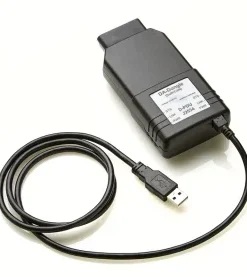
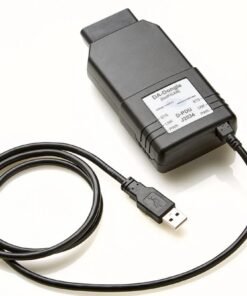
| DA-DoIP VCI | Yes | Yes | Firmware v2.8+ |
| TopDon RLink X7 | Yes | Partial | Firmware v3.1+ |
| VNCI JLR DoIP | Limited | No | Not SDS-certified |
Aftermarket VCIs that are not JLR-approved cannot obtain the required certificates and will fail SDS authentication. Always verify the firmware version before starting a programming session.
Active TOPIx Cloud Subscription
Programming Mode requires an active subscription with programming privileges. The Ultimate plan at £1599/month includes unlimited programming sessions, LSID-linked security functions, and priority support. The Professional plan at £799/month includes Service Mode authentication but limits programming hours. For occasional programming, pay-as-you-go programming tokens are available. Compare plans here.
JLR ID with Correct Permissions
Your JLR ID must have the correct role permissions and be in good standing, with no compliance flags or unpaid invoices. If your JLR ID has been downgraded or suspended, TOPIx Cloud will reject the authentication even if your subscription is active.
LSID for Programming Authorization
For security-critical programming, an active LSID (Licenced Security ID) is mandatory. LSID is a separate credential from your TOPIx Cloud subscription. It requires DBS clearance, premises verification, and a £5 million public liability insurance policy. See our LSID Authorization Guide for the full application process.
Stable Internet Connection (Ethernet/Wired Preferred)
The authentication phase, VBF file download, and programming token validation all require internet. A wired Ethernet connection is strongly recommended for programming. WiFi is acceptable for diagnostics but introduces risk during long sessions. A minimum of 10 Mbps is recommended; 25 Mbps+ is preferred for large VBF downloads.
Common SDS Errors and Solutions
SDS errors usually relate to authentication, certificates, or session management. Here are the most common errors and their resolutions.
Authentication Failed (VCI Not Registered)
Symptom: "Authentication failed. VCI certificate not recognised by JLR backend."
Cause: The VCI certificate is missing, expired, or revoked. Common causes include outdated firmware, a cloned VCI with invalid certificates, or a VCI that has been reported stolen.
Solution: Update the VCI firmware using the manufacturer's tool. Verify the serial number against your purchase records — mismatches indicate cloning. Contact your supplier to confirm certificate status. If using a genuine Bosch VCI, verify registration in the Bosch VCI Manager portal.
Session Timeout (Security Timeout)
Symptom: "Session terminated due to security timeout. Please restart the session."
Cause: The programming session exceeded the SDS time limit, or the vehicle went to sleep during a long operation.
Solution: Maintain battery at 13.5–14.5V with a battery support unit. Keep the vehicle awake by pressing the brake pedal or opening a door. Use a wired connection. For very large flashes, break the operation into smaller modules if possible.
Protocol Mismatch (Wrong UDS Service)
Symptom: "Negative response code 0x7F received. Service not supported in active session."
Cause: The UDS service requested is not allowed in the current SDS session level, or the SecOC MAC is invalid.
Solution: Verify the session is in Programming Mode, not Service Mode. Check that the VCI supports the correct SDS protocol version. Restart the session to force a fresh SecOC key derivation. If the error persists, verify the vehicle software level is not corrupted.
Certificate Expired (Firmware Update Needed)
Symptom: "VCI certificate expired. Update firmware to restore authentication."
Cause: The VCI's X.509 certificate has passed its validity date. Certificates are typically valid for 1–2 years and are renewed via firmware updates.
Solution: Connect the VCI via USB. Open the manufacturer's firmware update tool and apply the latest firmware. Restart the DDA and TOPIx Cloud. Verify the new certificate validity date in the VCI management tool.
FAQ
Q: What is JLR Secure Diagnostics (SDS)?
A: SDS is JLR's authenticated and encrypted diagnostic architecture. The VCI must present a valid certificate, communication is encrypted with TLS, and every message is authenticated with SecOC. It is mandatory on 2022+ vehicles and expanding to all MY25.5+ JLR models.
Q: Does SDS mean I can no longer use my aftermarket VCI?
A: JLR-approved aftermarket VCIs like the DA-DoIP VCI support SDS with current firmware. Non-approved VCIs like the VNCI JLR DoIP do not hold valid certificates and will be rejected. Check your VCI's firmware and approval status before attempting SDS sessions.
Q: Why does TOPIx Cloud need internet for SDS?
A: Internet is required for VCI certificate validation against JLR's backend, LSID checks, and programming token authorisation. The actual diagnostic communication is local, but the authentication chain requires real-time connectivity.
Q: What happens if my VCI firmware is outdated?
A: Outdated firmware usually means expired certificates, causing SDS authentication to fail. Update the firmware through the manufacturer's tool before attempting SDS sessions. Updates take 5–15 minutes.
Q: Can I bypass SDS if the vehicle is in a "no signal" area?
A: No. There is no offline bypass. The authentication is server-side and cannot be skipped. Mobile technicians should use a 4G/5G mobile hotspot as a backup, or schedule SDS programming where reliable internet is available.
Q: What is the difference between Service Mode and Programming Mode?
A: Service Mode allows DTC reading, live data, actuator tests, and routine control. Programming Mode adds firmware flashing, calibration writing, and security module programming. It requires an Ultimate or Enterprise subscription and LSID for security functions.
Q: Do I need LSID for all SDS operations?
A: No. LSID is only required for security-critical functions: key programming, KVM/BCM replacement, immobiliser reset, and SGW bypass. Routine diagnostics and most module programming do not require LSID. However, Programming Mode requires an Ultimate subscription.
Q: What is SecOC and why do I keep seeing "MAC invalid" errors?
A: SecOC (Secure Onboard Communication) appends a cryptographic MAC to each diagnostic message. "MAC invalid" means the VCI and vehicle are not using the same session key, usually after a timeout, disconnection, or firmware mismatch. Restart the session to re-derive the keys.
Q: Are all JLR vehicles moving to SDS?
A: Yes. All 2022+ vehicles already use SDS. MY25.5+ vehicles will enforce it for all diagnostic sessions, including basic DTC reading. Pre-2020 vehicles on CAN bus are not affected.
Q: What happens if authentication fails three times?
A: Both enter a temporary lockout. The VCI may be blocked for 30 minutes, and the vehicle may refuse sessions for 10 minutes. Do not retry blindly — diagnose the certificate or firmware issue first.
Conclusion
JLR Secure Diagnostics represents a fundamental shift in how independent workshops interact with modern vehicles. The open diagnostic model has been replaced by a cryptographically verified architecture where trust is established through certificates, session keys, and authenticated messages. Understanding the SDS stack — UDS for services, DoIP for transport, SecOC for authentication, and TLS for encryption — is essential for troubleshooting the new generation of errors. Technicians who adapt will continue to operate at dealer level. Those who do not will find themselves locked out.
TOPIx Cloud handles the entire SDS security stack automatically. From VCI certificate validation to session key management to encrypted programming, the platform abstracts the cryptography so you can focus on the vehicle. Every subscription includes full SDS Service Mode access. For programming under SDS, the Ultimate plan at £1599/month provides unlimited sessions, LSID-linked security functions, and priority technical support. For fleet operators, Enterprise plans deliver compliance-wide security monitoring and centralised VCI management.
Ready to work with JLR Secure Diagnostics? Compare TOPIx Cloud subscription plans and ensure your VCI is SDS-ready with our VCI compatibility guide. If you need LSID accreditation for security programming, our LSID Authorization Guide walks you through the full process.
Last updated: July 2026 | Technical specifications are based on JLR TOPIx Cloud and SDS documentation as of this date. Protocol details may change with future vehicle software updates.