TOPIx Cloud VCI Compatibility Guide: Which Interface Works Best?
Choosing the right Vehicle Communication Interface (VCI) for TOPIx Cloud is one of the most consequential decisions any independent JLR workshop, mobile technician, or locksmith will make. Get it right, and you unlock seamless diagnostics, programming, and key coding across the entire Jaguar and Land Rover range. Get it wrong, and you face connection failures, incomplete sessions, and costly frustration.
The JLR diagnostic landscape has become genuinely confusing. Dozens of interfaces flood the market — from genuine Bosch OEM units to budget passthru devices — each claiming full compatibility. The reality is more nuanced. Some VCIs handle every JLR protocol flawlessly. Others work on older CAN vehicles but fail on newer DoIP models. Since JLR made TOPIx Cloud mandatory for 2022+ vehicles, the stakes have only risen.
This guide cuts through the noise. We compare every major VCI that works with TOPIx Cloud — the genuine JLR DoIP VCI, the DA-DoIP VCI, the VNCI JLR DoIP, the TopDon RLink X7, and legacy options. We cover specifications, protocols, pricing, setup, driver downloads, and troubleshooting. Whether you are a beginner, a high-volume workshop, or a mobile technician, this article gives you the exact recommendation you need.
Not sure which VCI you need? Use our VCI Matchmaker — tell us your vehicle, and we will tell you exactly what to buy. It takes under thirty seconds and eliminates the guesswork.
What Is a VCI and Why Do You Need One for TOPIx Cloud?
What is a Vehicle Communication Interface (VCI)?
A Vehicle Communication Interface (VCI) is the physical bridge between your workshop computer and the vehicle's electronic control units (ECUs). It translates high-level diagnostic commands from your PC into low-level protocols the vehicle understands, and vice versa. For JLR vehicles, this means converting PC-based requests into CAN, DoIP, or J2534 passthru messages that modules like the BCM and ECM can process.
Think of the VCI as an interpreter between two parties speaking different languages. Your computer speaks TCP/IP. A 2023 Range Rover Sport speaks DoIP over Ethernet. Without a VCI, neither can understand the other. The VCI handles translation, voltage level shifting, protocol timing, and security handshakes.
How does a VCI connect to TOPIx Cloud?
TOPIx Cloud is JLR's browser-based diagnostic platform. Unlike the older SDD software, TOPIx Cloud operates through a web interface. However, your PC still needs the Diagnostic Device Agent (DDA) — a local software layer that manages the physical connection between your VCI and the vehicle.
The chain is simple: your PC (running DDA) connects to the VCI via USB or WiFi. The VCI connects to the vehicle's OBD-II port. When you start a TOPIx Cloud session, the platform sends requests through your browser to the DDA, which forwards them to the VCI, which translates them into vehicle protocol and pushes them to the relevant ECU. Responses travel the same path in reverse. If any link breaks — a missing driver, a loose cable, a firewall blocking DDA — the session fails.
DoIP vs CAN vs J2534 — what the protocols mean for JLR
CAN (Controller Area Network) was the backbone of JLR diagnostics from the 1990s through the mid-2010s. Vehicles such as the Discovery 3 (2004-2009), Range Rover L322 (2002-2012), and Jaguar X-Type all communicated over standard CAN bus at 500 kbps. A basic VCI or Mongoose cable could handle these vehicles.
J2534 is an SAE standard that defines a passthru programming interface. It allows aftermarket VCIs to reprogram ECUs provided the manufacturer publishes the software. JLR supports J2534 passthru for certain programming functions on pre-2022 vehicles. The DA-DoIP VCI and TopDon RLink X7 both advertise J2534 compliance, which is useful for workshops that also service other makes.
DoIP (Diagnostics over Internet Protocol) is the protocol that defines modern JLR diagnostics. Introduced from 2017 onwards and mandatory for 2022+ vehicles, DoIP sends diagnostic traffic over Ethernet at 100 Mbps — a 200-fold increase over CAN. This matters because modern JLR vehicles have firmware files that are several gigabytes in size. Programming a BCM or ECM on a 2023 Range Rover over CAN would take hours. Over DoIP, it takes minutes. But DoIP requires a VCI with an Ethernet transceiver and firmware that handles JLR's specific DoIP implementation including security layers. Not all "DoIP" VCIs on the market are equal.
Can you use TOPIx Cloud without a VCI?
No. Absolutely not. TOPIx Cloud has no built-in VCI hardware. It is purely a software platform. Without a VCI, you cannot establish a physical connection to the vehicle, and TOPIx Cloud will display a "No VCI detected" message. There is no workaround, no software emulation, and no way to use a generic Bluetooth OBD dongle. The JLR diagnostic stack is proprietary, encrypted, and requires certified hardware.
Some workshops have tried using cheap ELM327 Bluetooth adapters or generic OBD-II cables. These will not work. They lack the protocol support, security certificates, and driver integration that TOPIx Cloud expects. The DDA software will not recognise them, and TOPIx Cloud would reject the session during authentication. If you are investing in JLR diagnostics, you must invest in a proper VCI. The market now offers options from £199 to £999, so every budget has a viable path.
TOPIx Cloud VCI Compatibility Matrix
JLR DoIP VCI (Bosch Genuine OEM)
The JLR DoIP VCI manufactured by Bosch is the genuine OEM interface that JLR dealers use. It is the reference standard against which all aftermarket VCIs are measured.
Specifications:
- Manufacturer: Robert Bosch GmbH
- Protocols: DoIP, CAN, K-Line, J2534
- Connection: USB 2.0 and WiFi (dual mode)
- Power: Vehicle OBD port (12V) or USB bus power
- Firmware: Updated via JLR's official VCI Manager software
- Dimensions: ~12 cm × 6 cm × 2 cm, ~150g
Pros: Guaranteed compatibility with every JLR vehicle from 1996 to present; full DoIP at 100 Mbps; recognised immediately by TOPIx Cloud and DDA; dealer-level support; firmware updates in step with vehicle software; supports all security functions including key programming and immobiliser work; warranty and repair service available.
Cons: Highest price point (£699-£999); not readily available from all aftermarket suppliers; no advantage over quality aftermarket VCIs for basic reading; repair turnaround can be slow.
Price: £699 – £999
Best for: High-volume workshops, main dealer-level operations, and MY25.5+ vehicles where JLR is tightening hardware certification. View current stock at JLR DoIP VCI product page.
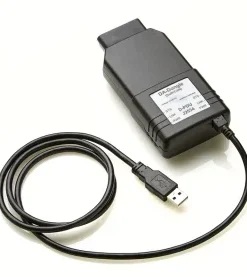
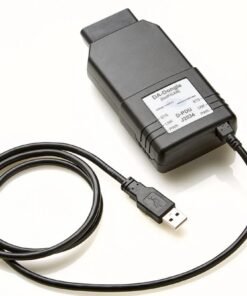
DA-DoIP VCI (Diagnostic Associates)
The DA-DoIP VCI from Diagnostic Associates is a J2534-compliant passthru device that has earned a strong reputation in the UK independent JLR market. It is the closest aftermarket equivalent to the genuine Bosch unit.
Specifications:
- Manufacturer: Diagnostic Associates (UK-based)
- Protocols: DoIP, CAN, J2534 passthru
- Connection: USB 2.0 and WiFi (dual mode)
- Power: OBD port powered with USB fallback
- Firmware: Updated via DA Device Manager software
- Approved for JLR TOPIx Cloud use (listed on JLR's passthru programme)
Pros: Excellent reliability; officially recognised on JLR's passthru approval list; strong DoIP performance at a fraction of OEM price; good UK-based support; handles programming, key coding, and calibration; J2534 support for other makes.
Cons: Slightly slower programming than Bosch on very large files; WiFi range not as robust as Bosch; occasional driver conflicts if multiple passthru drivers are installed.
Price: £249 – £399
Best for: Professional workshops wanting near-OEM performance without the OEM price. See our DA-DoIP VCI product page for current pricing.
VNCI JLR DoIP
The VNCI JLR DoIP is a Chinese-manufactured aftermarket VCI that has gained traction due to its low price and broad feature set. It is not JLR-approved, but it works with TOPIx Cloud for most functions.
Specifications:
- Manufacturer: VNCI (various OEM producers)
- Protocols: DoIP, CAN, J2534 (partial)
- Connection: USB 2.0 and WiFi
- Power: OBD port
- Firmware: Updated via VNCI Device Manager
Pros: Lowest-cost DoIP VCI at £199-£299; handles basic diagnostics and fault reading; WiFi works for reading and light coding; popular among beginners; free firmware updates.
Cons: Not on JLR's approved passthru list; significantly slower programming; intermittent key programming; variable build quality; WiFi stability issues during long sessions; may not work with MY25.5+ vehicles.
Price: £199 – £299
Best for: Beginners and workshops that only occasionally service 2017+ JLR vehicles. Not recommended for high-volume programming or critical immobiliser work without a backup VCI.
TopDon RLink X7
The TopDon RLink X7 is a multi-brand J2534 passthru device that also supports JLR DoIP. It is positioned as a premium aftermarket option with a broader feature set than the VNCI.
Specifications:
- Manufacturer: TopDon
- Protocols: DoIP, CAN, J2534, K-Line, UDS
- Connection: USB 2.0 and WiFi
- Power: OBD port with USB charging option
- Display: OLED screen showing connection status and IP address
- Firmware: Updated via TopDon software suite
Pros: Solid build quality; OLED screen; multi-brand capability (Ford, GM, Toyota); good programming speed; reliable WiFi; global support network.
Cons: More expensive than VNCI with less JLR-specific optimisation; some security functions not supported; fiddly driver installation; not officially JLR-approved.
Price: £349 – £499
Best for: Workshops that service multiple makes alongside JLR. Good for mid-volume JLR work where the genuine Bosch is too expensive but the VNCI is too basic.
Mongoose JLR Cable (legacy)
The Mongoose JLR is a dedicated USB cable with built-in protocol translation for CAN and K-Line JLR vehicles. It was the standard interface for the SDD era.
Specifications:
- Manufacturer: Drew Technologies (now part of Opus IVS)
- Protocols: CAN, K-Line (no DoIP)
- Connection: USB 2.0 only
- Software: SDD (not natively compatible with TOPIx Cloud)
Current status: The Mongoose JLR cable does not support DoIP. It is effectively obsolete for 2017+ vehicles. Some technicians keep a Mongoose cable for old SDD-era vehicles, but it is not a viable primary interface for a modern JLR workshop.
Best for: Legacy SDD support only. If you already own one, keep it for pre-2017 vehicles. Do not buy one new for TOPIx Cloud work.
VXDIAG VCX NANO — compatibility status, limitations
The VXDIAG VCX NANO is a low-cost multi-brand interface that includes a JLR mode.
Specifications:
- Manufacturer: VXDIAG (various OEMs)
- Protocols: CAN, DoIP (claimed), J2534 (claimed)
- Connection: USB and WiFi (depending on variant)
- Power: OBD port
Current status: The VXDIAG VCX NANO for JLR is a mixed bag. It works for basic diagnostics on many CAN-era vehicles, but its DoIP implementation is incomplete. We have tested it on 2020+ vehicles and found that it fails during programming sessions and cannot handle key programming on newer BCMs.
Best for: Very basic fault code reading on a tight budget. Not recommended as a primary tool for any professional workshop or mobile technician needing reliable programming capability.
Comparison summary table
| Interface | Price | DoIP | USB | WiFi | Vehicle Years | Key Programming | ADAS | Programming Speed | Warranty |
|---|---|---|---|---|---|---|---|---|---|
| JLR DoIP VCI (Bosch) | £699-£999 | Full | Yes | Yes | 1996-2026+ | Full | Yes | Excellent | 1-2 years |
| DA-DoIP VCI | £249-£399 | Full | Yes | Yes | 1996-2026+ | Full | Yes | Very Good | 1 year |
| VNCI JLR DoIP | £199-£299 | Partial | Yes | Yes | 1996-2025 | Intermittent | Limited | Moderate | 6-12 months |
| TopDon RLink X7 | £349-£499 | Full | Yes | Yes | 1996-2026+ | Partial | Yes | Good | 1 year |
| Mongoose JLR | £50-£100 (legacy) | No | Yes | No | Pre-2017 | No | No | N/A | N/A |
| VXDIAG VCX NANO | £80-£150 | Partial | Yes | Yes | Pre-2020 basic | No | No | Slow | 6 months |
Which VCI Should You Buy for Your Specific Needs?
Best VCI for beginners / first-time JLR technicians
The VNCI JLR DoIP at £199-£299 is the lowest-risk entry point. It handles DoIP and CAN for reading, clearing, and basic coding. Key programming may be inconsistent, so test thoroughly. Our Starter Diagnostic Kit bundles a VNCI with cables and support from £249.
Best VCI for professional workshops (high volume)
The DA-DoIP VCI at £249-£399 is the sweet spot. It offers near-OEM reliability at one-third the Bosch cost, with J2534 support for other makes. Pair it with our Workshop Diagnostic Kit. For the highest-volume operations, the genuine JLR DoIP VCI at £699-£999 is the only choice — its bulletproof reliability pays for itself during daily BCM or ECM updates.
Best VCI for mobile technicians (portability, WiFi)
The DA-DoIP VCI is our top recommendation for mobile technicians. Its WiFi is stable enough for roadside diagnostics, and the unit is compact for a tool bag. The genuine Bosch is excellent but the price premium is harder to justify for mobile. The VNCI is tempting, but WiFi instability makes it risky for mobile programming. Our Mobile Technician Kit bundles the DA-DoIP with a tablet mount and power bank from £599.
Best VCI for locksmiths (key programming focus)
The JLR DoIP VCI (Bosch) is the only interface we recommend with full confidence for key programming. The DA-DoIP handles most key programming reliably. The VNCI should be avoided — it works on some vehicles but fails unpredictably. Our Locksmith Specialist Kit includes the DA-DoIP with key programming guides from £749.
Best VCI for ADAS calibration work
Both the JLR DoIP VCI (Bosch) and the DA-DoIP VCI handle ADAS calibration on all JLR vehicles that support it. The TopDon also supports ADAS on many models. The VNCI does not reliably handle ADAS calibration. Our ADAS Calibration Kit bundles the DA-DoIP with a calibration target board from £1,299.
Best budget VCI under £300
The VNCI JLR DoIP at £199-£299 is the only DoIP-capable VCI under £300. For beginners or part-time technicians, it is a viable entry point. Avoid programming on customer vehicles until you have tested thoroughly, and do not rely on it for key programming. Our Starter Diagnostic Kit bundles the VNCI with warranty and support from £249.
Best premium VCI with full OEM support
The JLR DoIP VCI (Bosch) is the undisputed premium option. It is the only interface with genuine JLR dealer support, guaranteed firmware updates, and full compatibility with every current and announced JLR diagnostic function. For MY25.5+ vehicles, JLR is introducing stricter VCI certification requirements, and the Bosch unit is the only interface guaranteed to remain compatible. View current stock on our JLR DoIP VCI product page.
How to Set Up Your VCI for TOPIx Cloud
Step 1 — Unbox and inspect your VCI
Inspect the unit before connecting. Check the OBD-II connector for bent pins. Verify the USB cable and any WiFi antenna are intact. If you purchased from us, the VCI will have been pre-tested.
Step 2 — Install VCI drivers
Do not plug the VCI into your PC before installing drivers — Windows may assign a generic driver that conflicts.
- JLR DoIP VCI: Download the Bosch VCI driver package from the JLR technical portal or our support library.
- DA-DoIP VCI: Install the DA Device Manager from Diagnostic Associates. This includes the passthru driver and configuration utility.
- VNCI: Install the VNCI Device Manager — a single executable for USB driver, WiFi utility, and firmware updater.
- TopDon RLink X7: Install the TopDon RLink software suite. This includes the J2534 driver and configuration tool.
After installation, restart your PC. The driver installer registers kernel-level components that only load on boot.
Step 3 — Install Diagnostic Device Agent (DDA)
DDA is the JLR software that bridges your VCI and TOPIx Cloud. Download the latest version from the JLR technical portal (Windows 10 or 11, 64-bit only). Run the installer with administrator privileges. After installation, DDA will show in your system tray. Double-click it to open the status window.
If you are not yet registered, see our TOPIx Cloud Login Guide for step-by-step instructions.
Step 4 — Connect VCI to your computer (USB vs WiFi)
USB connection: Plug the VCI into a USB 2.0 or 3.0 port. USB 3.0 is preferred for programming. Do not use unpowered USB hubs. Wait for Windows to recognise the device, then open DDA to confirm the VCI is listed.
WiFi connection: Power on the VCI by connecting it to the vehicle's OBD port. The VCI will broadcast a WiFi network (SSID varies by manufacturer). Connect your PC to this network. Some VCIs allow your PC and the VCI to join the same workshop network instead. In DDA, select the WiFi connection mode and verify the IP address is detected.
Step 5 — Connect VCI to the vehicle's OBD port
Locate the OBD-II port under the driver's side dashboard. On the Defender L663, it is behind a small panel in the footwell. Insert the VCI firmly. The power LED should illuminate. If it does not, the ignition may need to be in the "on" position.
Step 6 — Verify connection in VCI Manager
Open VCI Manager or your manufacturer's equivalent. The software should show the VCI as connected and display the firmware version. If the VCI is not detected, check your connection, then restart DDA.
Step 7 — Launch TOPIx Cloud and confirm vehicle communication
Open your browser and log in to TOPIx Cloud. Start a new diagnostic session and select your VCI from the dropdown. The platform will attempt to identify the vehicle automatically. If it succeeds, you will see the VIN within 30 seconds. Common first-time issues: DDA not running, browser blocking pop-ups, or the VCI not being selected in the session settings.
Step 8 — Firmware update check
Before starting any programming session, check that your VCI firmware is up to date. Outdated firmware is the single biggest cause of failed programming sessions. Use your manufacturer's update tool:
- Bosch: VCI Manager
- DA-DoIP: DA Device Manager
- VNCI: VNCI Device Manager
- TopDon: RLink software suite
Connect the VCI to your PC via USB, run the update tool, and apply any available updates. The process takes 2-5 minutes. Do not disconnect during the update — this can brick the device. After updating, verify the version and restart DDA.
Need help setting up? Our Remote Installation Service connects a JLR specialist to your PC via secure remote desktop. We install every driver, configure DDA, test your VCI, and verify TOPIx Cloud connectivity. Sessions start from £49 and typically take 45 minutes.
VCI Driver Downloads
JLR DoIP VCI drivers (official Bosch link)
The official Bosch VCI driver package is available from the JLR technical portal. You need an active TOPIx Cloud subscription to access the portal. The package includes VCI Manager, USB driver, WiFi configuration utility, and DDA installer.
Download directly from JLR or contact us for a pre-packaged driver bundle.
DA-DoIP VCI drivers (Diagnostic Associates link)
Diagnostic Associates provides the DA Device Manager from their support portal. The package includes the DA-DoIP VCI USB driver, WiFi configuration tool, firmware updater, and J2534 passthru driver for multi-brand use.
Download from the Diagnostic Associates support site or request a direct link from our support team.
VNCI Device Manager (download link)
The VNCI Device Manager is a single installer that handles drivers, WiFi setup, and firmware updates. It is available from the VNCI manufacturer or from our support library. Download only from the official source or from us — third-party sites sometimes distribute outdated versions that cause driver conflicts.
TopDon RLink X7 software (download link)
TopDon provides the RLink software suite through their website. Registration is required. The suite includes RLink X7 USB and WiFi drivers, J2534 passthru driver, firmware update tool, and device configuration utility.
VCI Manager (JLR) — official driver package
VCI Manager is the official JLR utility for managing the genuine Bosch VCI. It is included in the TOPIx Cloud setup package. If you need only VCI Manager without the full TOPIx Cloud installer, contact our support team — we can provide the standalone utility for customers who purchased their VCI from us.
Common VCI Connection Issues and Fixes
"VCI not detected by computer" — driver, USB port, cable
If your PC does not recognise the VCI when plugged in:
- Missing or wrong driver: Check Device Manager. Look for an unknown device or yellow warning triangle. If found, uninstall the device, download the correct driver, and reinstall.
- USB port issue: Try a different USB port, preferably a direct port on the rear of a desktop or laptop. Avoid USB hubs and extension cables. USB 3.0 ports can sometimes cause issues with older VCI drivers — try USB 2.0 if 3.0 fails.
- Cable failure: Test with a spare cable if available. Cables that have been repeatedly coiled can develop internal fractures that show no external damage.
"VCI connects to computer but not vehicle" — ignition, OBD port, protocol mismatch
If your PC sees the VCI but the VCI cannot talk to the vehicle:
- Ignition position: Ensure the ignition is in the "on" position (position II). On push-button vehicles, press the start button without your foot on the brake.
- OBD port damage: Inspect the OBD port for bent or corroded pins. The pin 16 (power) and pin 4/5 (ground) pins are most critical. Straighten bent pins carefully. Clean corroded pins with electrical contact cleaner.
- Protocol mismatch: Open VCI Manager and verify automatic protocol detection. If locked to CAN and connecting to a 2022+ DoIP vehicle, it will not communicate.
- Vehicle sleep mode: JLR vehicles enter deep sleep after 30-60 minutes of inactivity. Wake the vehicle by opening a door or pressing the unlock button.
"TOPIx Cloud says no VCI found" — DDA not running, competing VCI drivers
If TOPIx Cloud displays "No VCI detected" even though your PC sees the VCI:
- DDA not running: Check your system tray for the DDA icon. Launch it from the Start menu if missing. DDA must be running before you open TOPIx Cloud.
- Competing drivers: Uninstall non-essential VCI drivers (e.g., VXDIAG, Launch, Autel) and restart. Their driver services may conflict with DDA.
- Browser issue: Ensure you are using Chrome or Edge (latest version). Disable ad-blockers for the TOPIx Cloud domain. Try clearing cache and cookies.
- Firewall or antivirus: Add DDA to your firewall exceptions. Windows Defender or third-party antivirus may block DDA's local network communication.
"Connection drops during programming" — WiFi stability, power management, USB selective suspend
A dropped connection during programming can leave an ECU in an unbootable state. Prevent this:
- Use USB for programming: Always use USB for programming. WiFi is fine for reading, but the risk of a drop during a 20-minute flash is unacceptable.
- Disable USB selective suspend: Disable it in Control Panel → Power Options → Change advanced power settings → USB settings → USB selective suspend setting → Set to "Disabled".
- Power management: Ensure your laptop is plugged into mains power and set to "Never sleep".
- Vehicle battery voltage: Use a battery stabiliser set to 14.4V during programming. Low voltage can cause the VCI to reset.
"DoIP connection timeout" — network config, firewall, vehicle sleep mode
DoIP uses Ethernet over the OBD port. If IP negotiation fails, you get a timeout.
- Network configuration: Most VCIs handle IP assignment automatically. If you have manually configured settings, ensure they are set to DHCP (automatic).
- Firewall blocking: Windows firewall may block the DoIP port (usually UDP 13400). Add an exception for DDA and your VCI's configuration utility.
- Vehicle not awake: Ensure the vehicle is awake. DoIP negotiation often fails if the vehicle is in deep sleep.
- VCI firmware outdated: Update your VCI firmware before troubleshooting anything else. Early DoIP implementations had bugs in the IP negotiation stack.
"Slow communication speed" — USB 2.0 vs 3.0, cable quality, WiFi interference
If diagnostic sessions are sluggish:
- USB 2.0 vs 3.0: For CAN-era vehicles, USB 2.0 is fine. For DoIP programming, USB 3.0 provides more bandwidth. Use a USB 3.0 port (usually blue) for best performance.
- Cable quality: Use the cable supplied with your VCI or a high-quality replacement. Avoid cables longer than 2 metres unless they are active (powered) cables.
- WiFi interference: If using WiFi, ensure you are on a clear channel. Switch to 5 GHz if your VCI supports it, or move to a less congested channel.
"VCI firmware update failed" — recovery mode, reflash procedure
If a firmware update fails, the VCI may become unresponsive. Most VCIs have a recovery mode.
- Bosch JLR DoIP VCI: Hold the reset button while connecting USB. This forces bootloader mode, allowing VCI Manager to reflash.
- DA-DoIP VCI: The DA Device Manager has a "Recover" option in the advanced menu. Connect via USB and select recovery.
- VNCI: The VNCI Device Manager includes a "Force Update" mode. Hold the button while plugging in USB, then run the updater.
- TopDon RLink X7: The RLink software suite has a firmware recovery wizard that detects and reflashes bricked units automatically.
If you cannot recover the VCI yourself, our Remote Installation Service includes firmware recovery.
Still stuck? Chat with a JLR specialist — we typically respond in under 2 minutes during working hours.
VCI Compatibility by Vehicle Model Year
Pre-2017 vehicles (SDD era) — which VCIs work
Pre-2017 JLR vehicles use SDD software, not TOPIx Cloud. However, modern DoIP VCIs like the Bosch, DA-DoIP, and TopDon all support backward-compatible CAN communication for these vehicles.
- JLR DoIP VCI (Bosch): Full compatibility. Works with SDD and TOPIx Cloud.
- DA-DoIP VCI: Full compatibility. The J2534 driver supports SDD passthru mode.
- VNCI JLR DoIP: Works for most pre-2017 vehicles. Some very early models (pre-2006) may need a specific driver mode.
- TopDon RLink X7: Full compatibility via J2534.
- Mongoose JLR: Native SDD compatibility. No DoIP needed.
- VXDIAG VCX NANO: Works on many pre-2017 vehicles but not all.
If you service a mix of old and new JLR vehicles, a modern DoIP VCI is the best single investment because it covers both eras.
2017-2021 vehicles (Pathfinder/TOPIx transition) — which VCIs work
The 2017-2021 period was a transition era. Some vehicles still used SDD, while others moved to TOPIx. The introduction of the 2017 Range Rover Velar, the 2018 I-Pace X590, and the 2020 Defender L663 marked the shift to DoIP.
For these vehicles, a DoIP VCI is essential. The Bosch and DA-DoIP handle this period flawlessly. The VNCI works for diagnostics but may struggle with programming on some 2020-2021 models. The TopDon is generally reliable. The Mongoose and VXDIAG are not suitable for DoIP vehicles in this range.
2022+ vehicles (TOPIx Cloud mandatory) — DoIP required
From 2022 onwards, JLR made TOPIx Cloud mandatory for all diagnostic and programming functions. SDD no longer supports these vehicles. DoIP is the only protocol used.
For 2022+ vehicles, you must have a full DoIP VCI. The Bosch and DA-DoIP are fully compatible. The TopDon works for most functions. The VNCI works for reading and clearing but may fail on programming for some 2024-2025 models as JLR increases security. Mongoose and VXDIAG are obsolete for this era.
Defender L663 (2020+) — specific DoIP requirements
The Defender L663 (launched 2020) was one of the first vehicles to use the JLR MLA architecture with full DoIP. It is demanding because the BCM requires a stable DoIP connection for coding changes, and key programming requires the VCI to maintain the DoIP session for 10-15 minutes without interruption. The OBD port is behind a small panel in the footwell, and some technicians initially struggle to seat the VCI fully.
We recommend the Bosch or DA-DoIP for Defender L663 work. The VNCI can handle basic diagnostics but is not reliable for key programming or module calibration on this model.
I-Pace X590 (EV) — specific requirements
The I-Pace X590, JLR's first fully electric vehicle, uses DoIP but adds specific requirements for the high-voltage battery management system (BMS) and the electric drive module (EDM). The BMS programming files are very large (up to 4GB), so programming speed matters. The vehicle also has a service mode that must be activated before diagnostics, and the I-Pace can enter a deep sleep mode that is harder to wake than combustion vehicles.
The Bosch and DA-DoIP both handle the I-Pace well. The TopDon works well for most functions. The VNCI may struggle with large BMS files due to slower transfer speeds. Always use USB for I-Pace programming, never WiFi.
MY25.5+ Secure Diagnostics — new VCI requirements
JLR has announced that from MY25.5 (model year 2025, mid-cycle update), a new Secure Diagnostics protocol will be implemented. This adds hardware authentication to the VCI-to-vehicle handshake.
What we know so far:
- The genuine Bosch JLR DoIP VCI will be updated via firmware to support Secure Diagnostics
- The DA-DoIP is expected to receive a firmware update, but this is not yet confirmed by JLR
- Aftermarket VCIs like the VNCI and TopDon may not be able to implement Secure Diagnostics unless they can replicate JLR's certification process
- MY25.5+ vehicles may refuse to communicate with uncertified VCIs
For workshops planning long-term, the genuine Bosch VCI is the safest investment. We will update this guide as soon as JLR releases the full specification.
FAQ
What is the best VCI for TOPIx Cloud in 2026?
The DA-DoIP VCI (£249-£399) offers the best balance of price, performance, and reliability for most workshops. For high-volume operations or MY25.5+ Secure Diagnostics, the genuine JLR DoIP VCI (Bosch) (£699-£999) is the reference standard.
Can I use a generic OBD scanner with TOPIx Cloud?
No. Generic OBD scanners and ELM327 adapters lack the protocol support, security certificates, and driver integration that TOPIx Cloud requires. You need a JLR-compatible VCI.
Do I need the genuine JLR DoIP VCI or will an aftermarket one work?
An aftermarket VCI will work for most functions. The DA-DoIP VCI and TopDon RLink X7 are both capable of professional JLR diagnostics. The genuine Bosch is only essential for MY25.5+, dealer-level support, or the absolute fastest programming speeds.
What's the difference between DoIP and J2534 passthru?
DoIP is the protocol — the language the vehicle and VCI speak. J2534 is a standard that defines how a passthru device should behave so multiple manufacturers can use the same hardware. A VCI can be both DoIP and J2534. The DA-DoIP and TopDon both advertise J2534 compliance, meaning they can also be used with Ford, GM, and other passthru programmes.
Can I use WiFi or do I need a USB cable?
For reading fault codes and live data, WiFi is convenient and works well. For programming — especially large module flashes — always use USB. A dropped WiFi connection during programming can leave an ECU in a corrupted state.
Will a VCI for BMW or Mercedes work with JLR?
Generally, no. VCIs are manufacturer-specific. A BMW ICOM or Mercedes SDconnect will not work with JLR TOPIx Cloud. The exception is multi-brand J2534 passthru devices like the TopDon RLink X7, but you still need the JLR-specific driver stack.
How often do VCI drivers need updating?
Check for driver and firmware updates every 3 months, or immediately before any major programming session. Outdated firmware can cause communication failures.
Can I use one VCI for multiple workshop PCs?
Yes, but not simultaneously. A VCI can only connect to one PC at a time. If you have multiple PCs, you can move the VCI between them, but each PC must have the correct drivers installed. For a multi-bay workshop, you may need multiple VCIs.
What happens if my VCI stops working during programming?
Do not panic. In many cases, the ECU has a recovery mode that allows you to resume or restart the flash. Reconnect the VCI, ensure the battery is stable, and restart the session. Using a high-quality VCI (Bosch or DA-DoIP) makes this extremely rare.
Do I need a VCI for every JLR model year?
One modern DoIP VCI covers all JLR model years from 1996 to present. The Bosch, DA-DoIP, and TopDon all support both CAN (pre-2017) and DoIP (2017+).
What's the warranty on aftermarket VCIs?
- Bosch JLR DoIP VCI: 1-2 years depending on supplier
- DA-DoIP VCI: 1 year from Diagnostic Associates
- VNCI JLR DoIP: 6-12 months depending on seller
- TopDon RLink X7: 1 year from TopDon
When you buy from topix-cloud.com, we honour the manufacturer's warranty and add our own 30-day no-quibble return policy.
Can I do key programming with a budget VCI?
The VNCI (£199-£299) may handle key programming on some vehicles but fails unpredictably on others. We do not recommend relying on a budget VCI for key programming as a business service. The DA-DoIP (£249-£399) handles key programming reliably across the range. The Bosch (£699-£999) is guaranteed for all key programming scenarios. Invest in the DA-DoIP as a minimum.
Is VNCI JLR DoIP reliable for professional use?
The VNCI is reliable for diagnostics but less reliable for programming. If your business depends on JLR work, the VNCI should be a secondary tool, not your primary interface.
How do I know if my VCI firmware is up to date?
Open your VCI management software, connect the VCI via USB, and click "Check for updates". The software will display the current and latest firmware versions. If they differ, update.
What VCI do you recommend for a mobile technician?
We recommend the DA-DoIP VCI (£249-£399). Its WiFi is stable enough for roadside diagnostics, it is compact, and it handles all JLR functions you are likely to need. The VNCI is tempting due to its low price, but WiFi instability makes it unsuitable for professional mobile use. Our Mobile Technician Kit bundles the DA-DoIP with a rugged case and power bank.
Conclusion
Choosing the right VCI for TOPIx Cloud comes down to matching your budget, your workload, and your technical requirements. Here is the summary:
- Beginners and tight budgets: The VNCI JLR DoIP (£199-£299) is a viable entry point, but plan to upgrade as your business grows.
- Professional workshops and mobile technicians: The DA-DoIP VCI (£249-£399) is the sweet spot — near-OEM performance, UK support, and reliable DoIP across all model years.
- High-volume operations, locksmiths, and ADAS specialists: The genuine JLR DoIP VCI (Bosch) (£699-£999) is the reference standard. It is the only interface guaranteed for MY25.5+ Secure Diagnostics and the most demanding programming tasks.
- Multi-brand workshops: The TopDon RLink X7 (£349-£499) offers excellent cross-manufacturer capability alongside solid JLR performance.
Whatever your situation, buy from a reputable supplier who provides support, warranty, and driver assistance. A cheap VCI from an anonymous marketplace seller is a false economy.
Still unsure which VCI to buy? Use our VCI Matchmaker — enter your VIN and get the exact recommendation with no guesswork. It takes under thirty seconds.
Shop VCI hardware at transparent prices — no registration required, no hidden costs. All prices include VAT and UK delivery. Browse our JLR DoIP VCI, DA-DoIP VCI, and complete diagnostic kits on our pricing page.
Related content
- TOPIx Cloud Login Guide — step-by-step access to the platform
- TOPIx Cloud Subscription Plans — compare access levels and features
- VCI Matchmaker Tool — find your perfect interface in seconds
- Remote Installation Service — we set everything up for you from £49
- Contact Support — speak to a JLR specialist in under 2 minutes