TOPIx Cloud and JLR Pathfinder Integration: Complete Guide
JLR Pathfinder is the official diagnostic and programming application for modern Jaguar and Land Rover vehicles, but it cannot programme modules, update software, or authorise security operations on its own. It requires TOPIx Cloud to deliver encrypted software, validate licences, and secure communication with JLR's servers. This guide explains how the two systems integrate, what each component does, and how to set up and troubleshoot the connection.
What Is JLR Pathfinder?
JLR Pathfinder is the dealer-grade diagnostic and programming tool that replaced SDD. Installed locally on a workshop PC, it is the primary tool for all JLR vehicles from the 2017 model year onwards, including the L663 Defender, L460 Range Rover, and the latest I-Pace and F-Pace models.
Pathfinder vs. SDD
SDD was the legacy system for vehicles up to approximately 2016, running on a Panasonic Toughbook with Windows Embedded and using the JLR VCM or Mongoose interface. SDD was largely offline, with updates via DVD.
Pathfinder supports modern Ethernet-based diagnostic protocols used on vehicles with the Jaguar Land Rover Electrical Architecture (LEA). It requires a more powerful laptop, Windows 10 or 11 Pro, and an internet connection to TOPIx Cloud for programming. SDD cannot programme modules on 2017+ vehicles; Pathfinder is mandatory for these platforms.
Pathfinder's Offline Capability
Pathfinder has substantial offline functionality. When installed locally, it can read and clear DTCs, display live data, run guided diagnostics, view vehicle configuration, and carry out service functions such as brake pad replacement or DPF regeneration. However, the moment a technician needs to programme a module, update software, or carry out a security-related operation, Pathfinder must connect to TOPIx Cloud.
Why Pathfinder Needs TOPIx Cloud for Programming
Vehicle programming on modern JLR models is not a simple file-flash operation. It requires downloading encrypted software files specific to the VIN, validating technician credentials via JLR ID, securing the communication channel, logging the event for warranty, and verifying completion. TOPIx Cloud provides all of these services. Without it, Pathfinder can read what a module needs but cannot deliver the programming file or authorise the operation.
What Is TOPIx Cloud?
TOPIx Cloud is Jaguar Land Rover's online service and information platform — the successor to the legacy TOPIx DVD-based workshop manual. It provides a web-based environment for technical information, service bulletins, and online programming services, accessed via a browser with a valid subscription linked to a JLR ID.
The Online JLR Service Platform
TOPIx Cloud hosts the complete workshop manual, wiring diagrams, TSBs, and campaign information. It also provides the online programming backend that Pathfinder relies upon. Subscriptions are tiered: the basic tier provides access to technical information and limited programming. For workshops carrying out regular programming, module replacement, and software updates, the Professional tier at £799 per month is recommended, providing unrestricted programming access, faster download speeds, and priority support. For occasional use, TOPIx Cloud is available from £79 with Pathfinder access.
Programming, Diagnostics, and Information Access
TOPIx Cloud is not simply a data repository; it is an active programming gateway. When Pathfinder initiates a programming request, TOPIx Cloud identifies the vehicle by VIN, retrieves the correct software build data, determines the appropriate software version based on the latest TSBs and campaigns, encrypts and delivers the programming files to Pathfinder, monitors the session in real time, and logs the completed session for JLR's warranty and vehicle history records. In addition to programming, TOPIx Cloud provides diagnostic support in the form of symptom-driven repair procedures, known fixes for common faults, and access to the latest calibration data.
How TOPIx Cloud and Pathfinder Work Together
The integration between Pathfinder and TOPIx Cloud operates as a client-server model: Pathfinder is the local client, and TOPIx Cloud is the remote server that authorises and delivers programming data. Understanding this flow helps diagnose issues when the connection fails.
Pathfinder as the Local Diagnostic Tool
Pathfinder is installed on the technician's PC and communicates with the vehicle via a VCI connected to the OBD-II port. It scans the vehicle network, identifies all installed control modules, and reads their current software versions. When a programming operation is selected, Pathfinder gathers the required data and prepares to request the programming files from TOPIx Cloud.
TOPIx Cloud as the Online Data and Programming Gateway
TOPIx Cloud acts as the gatekeeper. It holds the master database of all software files for all JLR vehicles, validates that the technician has the right to programme the vehicle, checks that the subscription is active, and delivers the correct encrypted files. TOPIx Cloud also provides the security certificates that allow Pathfinder to authenticate itself to the vehicle's modules, preventing unauthorised programming.
The Authentication Flow
When Pathfinder connects to TOPIx Cloud, the following authentication steps occur:
- JLR ID: The technician logs into Pathfinder using their JLR ID. This is the same account used to access TOPIx Cloud in the browser. The JLR ID identifies the user and their associated workshop.
- LSID (Licence Server ID): Pathfinder communicates with JLR's licence server to validate the software installation. The LSID is a unique identifier generated during Pathfinder installation that ties the local software instance to the workshop's licence.
- VCI Validation: The Vehicle Communication Interface is validated to ensure it is an authorised JLR-compatible device. Non-authorised interfaces may be blocked from programming operations.
- Vehicle Authentication: Once the user and VCI are validated, TOPIx Cloud authenticates against the vehicle's VIN. It checks that the vehicle exists in JLR's database and that the requested programming operation is permitted.
Only when all four steps are complete does TOPIx Cloud release the programming files. This multi-layer authentication ensures only authorised technicians with valid subscriptions can programme JLR vehicles.
When Pathfinder Calls TOPIx Cloud APIs
Pathfinder calls TOPIx Cloud APIs automatically when programming is required:
- Module Programming: Pathfinder sends the module ID, current software version, and VIN to TOPIx Cloud. The cloud responds with the correct programming file and sequence.
- Software Updates: Pathfinder queries TOPIx Cloud to determine if a newer software version exists for a given TSB or campaign and downloads it if available.
- Key Programming: Security operations such as adding or replacing keys require TOPIx Cloud to validate the technician's authorisation and provide the security tokens needed to write to the immobiliser module.
- CCF Editing: Changes to the Car Configuration File (CCF) that alter vehicle specification require online validation. Pathfinder sends the proposed CCF changes to TOPIx Cloud, which validates them against the vehicle's build specification before authorising the write.
- Module Replacement: When a blank or replacement module is fitted, Pathfinder must request the initial programming data from TOPIx Cloud, as the module cannot function without the correct software.
In each case, Pathfinder handles the API communication transparently. The technician sees a progress bar and status messages, but the underlying file transfer and validation happen automatically.
Step-by-Step Integration Setup
Setting up Pathfinder and TOPIx Cloud requires attention to software versions, account credentials, and hardware connections.
Step 1 — Install Pathfinder (Latest Version from JLR)
Pathfinder is available through the JLR workshop portal. Ensure you download the latest release, as older versions may not support the newest vehicles or TOPIx Cloud API endpoints. Installation requires Windows 10 Pro or Windows 11 Pro (64-bit), minimum 8 GB RAM (16 GB recommended), an SSD with at least 100 GB free space, a stable internet connection (minimum 10 Mbps, 50+ Mbps recommended for large files), and a USB 3.0 port for the VCI.
During installation, Pathfinder registers itself and generates an LSID. Record this identifier for licence support. After installation, launch Pathfinder and verify it opens without errors before proceeding to account setup.
Step 2 — Create JLR ID and TOPIx Cloud Account
If you do not already have a JLR ID, register at the JLR workshop portal. You will need your workshop name and address, VAT number (for UK workshops), contact email and phone number, and preferred subscription tier.
Once the JLR ID is created, activate your TOPIx Cloud subscription and link it to the same JLR ID used in Pathfinder. Log into TOPIx Cloud via a web browser to confirm the subscription is active and that you can access programming services. Make a note of expiry dates and ensure payment details are current to avoid interruptions.
Step 3 — Connect VCI to Vehicle and Laptop
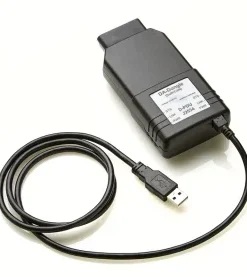
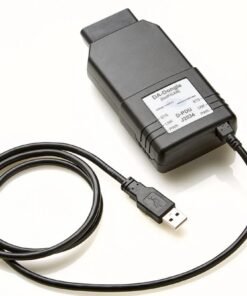
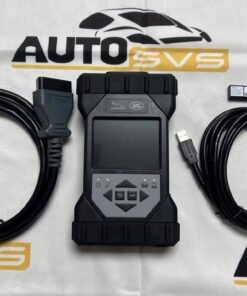
The VCI is the bridge between Pathfinder and the vehicle. JLR-approved VCIs include the JLR VCI (part number JLR-14-392-001) and certain DrewTech Mongoose interfaces. Ensure your VCI firmware is up to date.
To connect: connect the VCI to the vehicle's OBD-II port under the dashboard on the driver's side, then connect the VCI to your laptop via USB. A wired USB connection is recommended for programming to avoid interruptions. Switch the vehicle ignition to position II (ignition on, engine off) — do not start the engine during programming. Ensure the vehicle battery is in good condition and preferably connected to a stabilised power supply. Programming can take 30 minutes to several hours depending on the number of modules, and a voltage drop can brick a control module.
Step 4 — Launch Pathfinder and Connect to Vehicle
Open Pathfinder on your laptop and log in with your JLR ID when prompted. Pathfinder will automatically detect the VCI if it is connected correctly. Select the vehicle connection option and allow Pathfinder to identify the vehicle. It will read the VIN, build data, and current module configuration. This initial scan may take 5–10 minutes. Once complete, Pathfinder will display a list of all control modules, their current software versions, and any fault codes present. Review the vehicle status before proceeding to programming.
Step 5 — Initiate Programming from Pathfinder (Calls TOPIx Cloud)
To programme a module or update software, select the module or programming operation from the Pathfinder menu. Pathfinder will display the current software version and any available updates. Select the desired programming action, and Pathfinder will contact TOPIx Cloud via the API. You will see a status message indicating that Pathfinder is requesting data from the online server. TOPIx Cloud will validate your subscription, authenticate the VIN, and prepare the programming files. This may take several minutes depending on server load and file size. Once validated, the programming files will download to your local machine. File sizes range from a few megabytes for minor calibration updates to over 1 GB for infotainment or powertrain module updates.
Do not disconnect the VCI or interrupt the internet connection during this download phase. If the download fails, Pathfinder will display an error code. Restarting the operation will usually resume the download from where it left off.
Step 6 — Complete Programming with TOPIx Cloud Data
After the files are downloaded, Pathfinder begins the actual programming sequence. The target module is placed into programming mode, and the original software is backed up where possible. The new software is written to the module — a progress bar shows completion percentage, which can take 5–30 minutes per module. Pathfinder verifies the written software by reading back the module's identification and comparing it to the expected checksum. If the module is a replacement or blank module, initialisation and configuration data are also written from the TOPIx Cloud download. Pathfinder clears any fault codes related to the module update and may request a module reset or ignition cycle.
For vehicles requiring multiple module updates (for example, during a campaign update), Pathfinder will sequence the updates in the correct order and prompt for ignition cycles between modules as required. Follow the on-screen instructions precisely.
Step 7 — Verify Programming Success
After programming completes, Pathfinder will display a summary report. Verify that the module shows the new expected software version, no new fault codes are present in the programmed module or related modules, and vehicle functions controlled by the module operate correctly. The TOPIx Cloud session log should also show the programming event as completed.
Save the Pathfinder session log and any TOPIx Cloud programming reports for your workshop records. These documents are essential for warranty claims and customer invoices.
Common Integration Tasks
Pathfinder and TOPIx Cloud integration supports a wide range of workshop programming tasks. The following are the most common operations.
Module Programming and Calibration
Control modules on modern JLR vehicles are software-defined. When a module fails and is replaced, the new module arrives blank or with generic firmware. Pathfinder, with TOPIx Cloud, programmes the correct software, calibrations, and vehicle-specific configuration into the module. This applies to engine control modules (ECM), transmission control modules (TCM), body control modules (BCM), infotainment and telematics modules, airbag and restraint modules, and ABS and chassis control modules. TOPIx Cloud holds the correct calibration data for each VIN.
Software Updates (TSBs, Campaigns)
JLR issues Technical Service Bulletins (TSBs) and campaigns to address known faults, improve performance, or add features. These updates are delivered as software patches. Pathfinder identifies the vehicle's current software levels and queries TOPIx Cloud for applicable TSBs. Common examples include transmission shift-quality improvements, infotainment stability fixes, battery management software updates for hybrid models, and ADAS calibration refinements. Campaign updates are typically free of charge to the vehicle owner during the campaign period. Pathfinder and TOPIx Cloud will indicate if a campaign is active and whether the update is billable or covered by JLR.
Key Programming (Requires TOPIx Cloud Authentication)
Adding or replacing keys is a security-sensitive operation. The immobiliser module and keyless entry system will only accept new keys when authorised by JLR's online security server. Pathfinder initiates the request, TOPIx Cloud validates the technician's credentials, and the security token is released. The process requires all existing keys present (if replacing a lost key, the old keys are invalidated), the new key to be programmed into the immobiliser and central locking systems, and a final sync to ensure the vehicle recognises the key. TOPIx Cloud may require additional verification for certain operations, especially if the VIN has a history of key-related security alerts.
CCF Editing Through Pathfinder with TOPIx Cloud
The Car Configuration File (CCF) defines the vehicle's specification and enables or disables features based on factory options. When retrofitting options, the CCF must be edited. Pathfinder provides the CCF editor interface, but the actual changes are validated and authorised by TOPIx Cloud. TOPIx Cloud checks the proposed CCF against the vehicle's build data and the JLR parts database. If the proposed change is physically possible, TOPIx Cloud authorises the write. Some changes are blocked if they conflict with homologation or safety certification. CCF editing should always be done with a stable connection, as an interrupted CCF write can leave the vehicle in a non-functional state.
Troubleshooting Integration Issues
Despite the integration being designed to be robust, workshops occasionally encounter issues connecting Pathfinder to TOPIx Cloud. The following are the most common problems and their solutions.
"TOPIx Cloud Not Available" Errors
This error indicates that Pathfinder cannot reach the TOPIx Cloud servers. Possible causes include internet connectivity loss, TOPIx Cloud maintenance, firewall or proxy blocking (ensure port 443 for HTTPS is whitelisted for TOPIx Cloud API endpoints and JLR licence servers), or an outdated Pathfinder version using deprecated API endpoints. If the error persists, restart Pathfinder and attempt the operation again. If it fails repeatedly, contact JLR technical support with the exact error code and timestamp.
VCI Not Recognised in Pathfinder
If Pathfinder does not detect the VCI, check the USB connection (try a different port, avoid USB hubs, connect directly to the laptop), ensure VCI drivers are installed, update the VCI firmware if outdated, ensure the vehicle ignition is in position II, and check that the vehicle battery voltage is sufficient (connect a battery stabiliser if necessary). If the VCI is recognised by Windows but not by Pathfinder, reinstall the VCI drivers and restart Pathfinder.
Authentication Failed (LSID or JLR ID Issues)
Authentication errors typically relate to the LSID or JLR ID. Ensure you are logged into Pathfinder with the same JLR ID linked to your TOPIx Cloud subscription. Verify that your TOPIx Cloud subscription has not lapsed by logging in via the browser. If Pathfinder was reinstalled or the hardware changed, the LSID may no longer match JLR's records — contact JLR support to reset the association. Also ensure no other technician in your workshop is using the same credentials for a concurrent programming session.
Slow Programming Due to Connection Issues
Slow download speeds or prolonged programming times can result from insufficient bandwidth (program during off-peak hours if your workshop shares internet), Wi-Fi instability (switch to a wired USB connection for programming), VPN or network routing delays (temporarily disable the VPN if your workshop policy allows), or server-side congestion during busy periods. If programming is consistently slow, perform a speed test on your workshop connection. A minimum of 10 Mbps download is recommended, with 50+ Mbps preferred for campaign updates involving multiple modules.
Frequently Asked Questions
What is the difference between Pathfinder and TOPIx Cloud?
Pathfinder is the local diagnostic software installed on your workshop PC. TOPIx Cloud is the online platform that provides programming data, technical information, and authentication services. Pathfinder handles vehicle communication; TOPIx Cloud provides the data and authorisation required for programming.
Can I use Pathfinder without TOPIx Cloud?
You can use Pathfinder for offline diagnostics such as reading fault codes, live data, and guided tests. However, you cannot programme modules, update software, or carry out security operations without an active TOPIx Cloud subscription.
Which vehicles require Pathfinder and TOPIx Cloud?
All Jaguar and Land Rover vehicles from the 2017 model year onwards require Pathfinder. Older vehicles use SDD. If you work on a mix of vehicle ages, you may need both systems installed.
What VCI do I need for Pathfinder?
JLR recommends the JLR VCI (part number JLR-14-392-001). Some DrewTech Mongoose interfaces are also compatible. Ensure your VCI firmware is current, as older interfaces may not support the latest vehicles.
How much does TOPIx Cloud cost for programming?
TOPIx Cloud subscriptions start from £99 per month with Pathfinder access. For workshops carrying out regular programming, the Professional tier at £799 per month is recommended and provides unrestricted access to all programming services.
Can I programme keys with Pathfinder and TOPIx Cloud?
Yes, key programming is supported but requires TOPIx Cloud authentication. The operation is validated online to prevent unauthorised key cloning.
What happens if the internet drops during programming?
If the internet connection drops during the download phase, Pathfinder will pause and retry. If it drops during the actual module write, the module may be left in an incomplete state. Always use a stable connection and a battery stabiliser. If a module fails to respond after an interruption, contact JLR support for recovery procedures.
Do I need a separate JLR ID for each technician?
Workshops can share a JLR ID for TOPIx Cloud access, but concurrent programming sessions may be restricted. For workshops with multiple technicians programming simultaneously, JLR may require additional licences. Check your subscription terms for concurrent session limits.
How long does a typical programming session take?
A single module update takes 15–30 minutes. Campaign updates involving multiple modules can take 2–4 hours. Complex operations such as full infotainment updates or CCF changes may require longer. Always allow sufficient time and do not rush the process.
Can I use Pathfinder on a virtual machine or remote desktop?
JLR does not officially support Pathfinder on virtual machines or remote desktop environments. The LSID and VCI detection may fail in virtualised environments. Use a native Windows 10/11 Pro installation on a physical laptop or PC for reliable operation.
Conclusion
The integration between TOPIx Cloud and JLR Pathfinder is the foundation of modern Jaguar and Land Rover programming. Pathfinder provides the local diagnostic interface and vehicle communication, while TOPIx Cloud delivers the encrypted software, validates credentials, and authorises security-sensitive operations. Together, they enable workshops to programme modules, update software, configure vehicle features, and programme keys on all 2017 and newer JLR vehicles.
Setting up the integration correctly requires a valid JLR ID, an active TOPIx Cloud subscription, an up-to-date Pathfinder installation, and a compatible VCI. The recommended setup for workshops carrying out regular programming is the TOPIx Cloud Professional tier at £799 per month. For occasional use, entry-level subscriptions from £79 with Pathfinder access are available.
By following the step-by-step setup guide and troubleshooting common issues, workshops can maintain a reliable programming workflow. Understanding how Pathfinder and TOPIx Cloud interact ensures that programming sessions are completed efficiently, modules are correctly configured, and vehicles are returned to customers with factory-grade software integrity. With the right setup, Pathfinder and TOPIx Cloud provide a powerful, dealer-equivalent programming environment for independent JLR specialists.